02x08-an_acceptable_em-dash.md
In this episode, Chris talks about an upcoming change to Entra ID Authentication Methods that may impact some tenants. And Koos dives into ‘Project Perception’, Microsoft’s brand new agentic AI cybersecurity platform.
Good-bye SMS MFA!
Microsoft announced this on 13 July 2026 and I’ve picked up on some confusion and a lot of incorrect coverage that overstates it. This isn’t “SMS MFA is banned.” Microsoft is retiring Microsoft-provided delivery for SMS and voice, and will no longer offer them as a native Entra capability. Organizations that still need this capability can contract one of Microsoft’s telecom partners through the Microsoft Security Store, and wear the telecom costs themselves - I checked this today and there isn’t a list of these partners available yet, but I’d expect typical players like Twilio to be in the list. I don’t think this is a bad move and I can’t really think of many/any scenarios anymore where SMS or voice calls are the only workable solution.
The important thing to understand here is that there are two changes bundled together. Firstly, Microsoft gets out of the telco business and secondly passkeys become the default experience. This second change is the one that will likely cause the biggest user impact. This all starts happening on 1 September 2026 - next week as we record this and likely yesterday as you listen to this!
The timeline
- 1 Sept 2026 - Users enabled for SMS or voice in the Authentication Methods Policy are auto-enabled for passkeys and nudged for Passkey registration upon MFA sign-in. Users can skip the prompt.
- 18 Sept 2026 - Supported telecom providers, deployment guidance and pricing published via the Security Store.
- 30 Oct 2026 - Admins can actually select and configure a third-party telecom provider.
- 1 Feb 2027 - Microsoft provided SMS and Voice fully retired in Microsoft Entra ID. After this date users whose only available MFA method is SMS or voice will be required to register a passkey during sign-in to continue accessing their account. This prompt will be blocking. Users must register a passkey before they can continue to sign in to their account.
The opt-out (and its limits)
There’s a temporary tenant-level opt-out covering the 1 Sept - 1 Feb window. It delays passkey auto-enablement and the Registration Campaign change while you configure a telecom provider or migrate users. There is no opt-out from the February enforcement.
Microsoft has released a PowerShell script that checks your Entra ID tenant’s SMS and Voice authentication method policy scope and shows the impact of the change. Script is linked below:
Links
- Entra SMS/Voice Policy Scanner
- Mirosoft Learn - Passkeys by default and retirement of Microsoft-provided SMS and voice authentication
Project Perception
On Monday July 27th Microsoft made a big announcement, and you’ve probably seen it all over your LinkedIn feed since: Project Perception. In short, it’s Microsoft’s agentic AI cybersecurity platform.
Microsoft isn’t exactly subtle about the framing either. Attackers now coordinate through AI agents, and according to Microsoft “reactive security is over”. Their answer boils down to: it takes agents to fight agents.
Now, you might think this is Microsoft’s marketing machine in overdrive. But the research backs it up:
- CrowdStrike measured an 89% year-over-year increase in AI-enabled adversary operations. CrowdStrike 2026 Global Threat Report
- The famously sober Verizon DBIR found attackers using GenAI across a median of 15 different techniques per campaign. Verizon 2026 Data Breach Investigations Report
- The ‘International AI Safety Report’ (90+ authors) reports that AI agents already find 77% of software vulnerabilities in competition settings; a capability that doubles roughly every seven months. International AI Safety Report 2026
- Anthropic literally caught a state-sponsored group letting AI run 80 to 90% of an espionage campaign.
So when Microsoft says attackers now coordinate through AI agents, they’re describing what’s already happening out there. That’s where Perception steps in. It promises ‘continuous, proactive defense’ across your identities, endpoints, applications, cloud and data, all working together as one system.
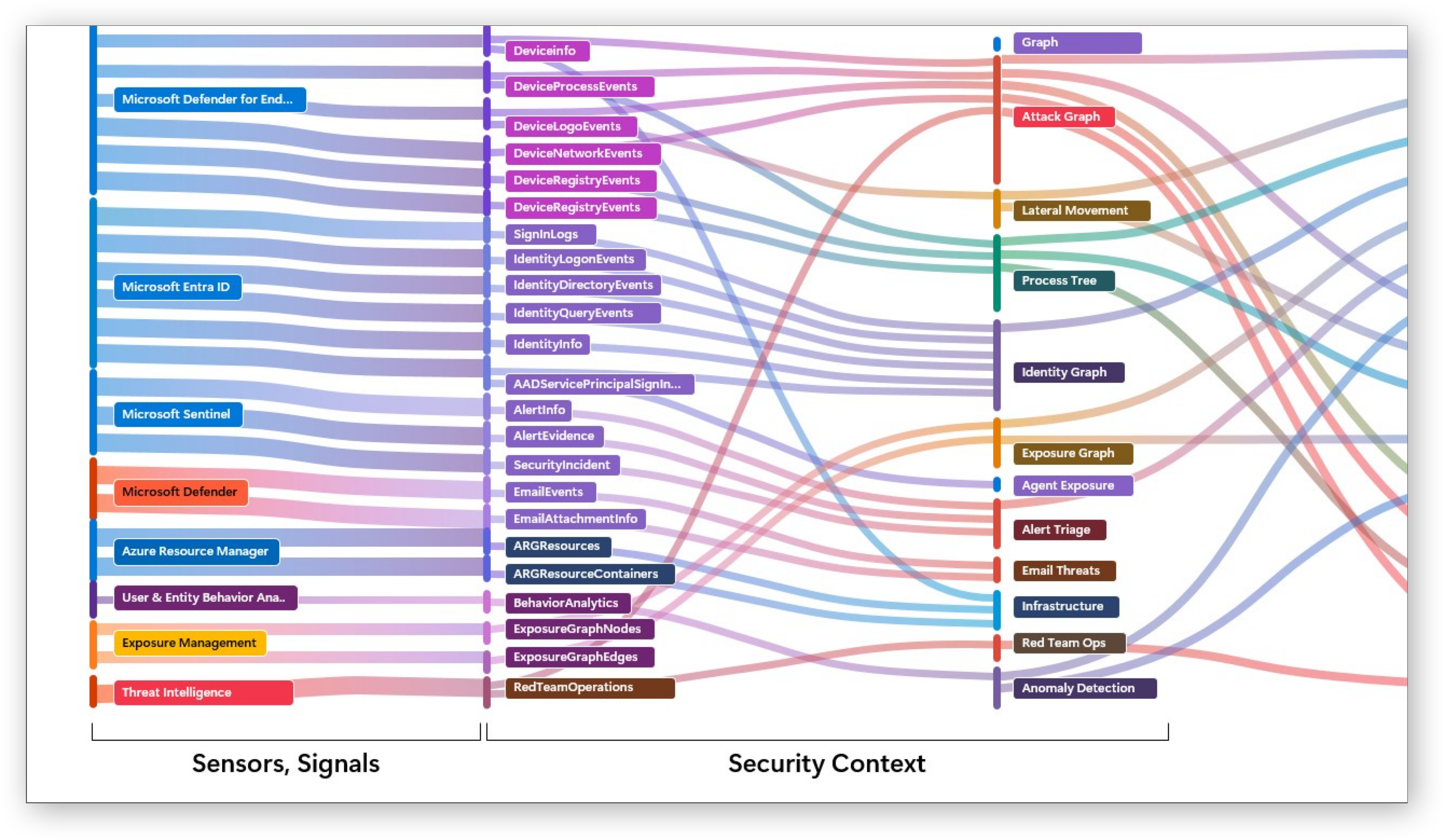 From Signals to Tables to Context
It works with teams of agents: red, blue and green teams.
- Red agents uncover attack paths and expose gaps before attackers do
- Blue agents detect, triage and investigate; they correlate signals and accelerate your response
- Green agents remediate findings and harden your posture
The routine, repetitive work can run on its own. And when it’s time to make a decision that actually matters, a human is asked to make it.
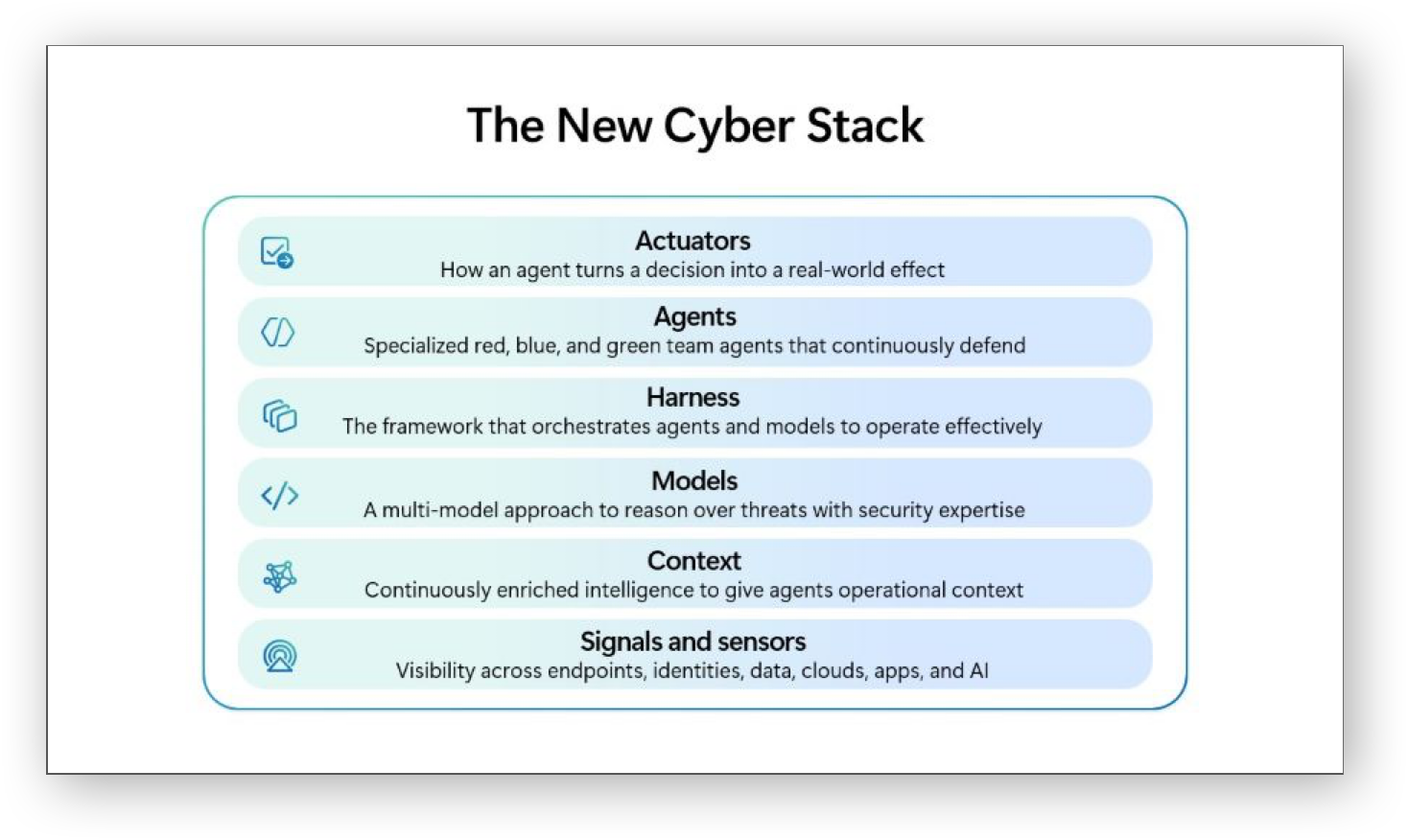 Microsoft Perception Architecture a.k.a. The New Cyber Stack
In-house Security Model
The technology behind these agent teams we’ve actually seen before. I haven’t covered it on this podcast yet, but it was on my to-do list. It was called “Project MDASH” (pronounced ‘em-dash’, short for ‘Multi-Model Agentic Scanning Harness’). It began as an internal project at Microsoft to hunt down vulnerabilities in software; it even uncovered a batch of previously unknown bugs in Windows itself. In July it was released in private preview and integrated into Defender’s Exposure Management.
And now they’ve equipped the harness with an in-house cybersecurity model called MAI-Cyber-1-Flash (say that ten times fast).
The “MAI” stands for “Microsoft AI”, it’s their in-house AI brand led by Mustafa Suleyman. They also released MAI-Transcribe-1, MAI-Voice-1, MAI-Image-2, and now MAI-Cyber-1-Flash.
- The red agents can hunt down vulnerabilities in your software and try to take advantage of these bugs to prove they’re actually exploitable
- The blue agents will propose new detections and hunting queries to detect future abuse
- The green agents make sure a fix actually lands and your posture improves
According to Microsoft, MDASH with MAI-Cyber-1-Flash (paired with GPT-5.4) scores 96% on the CyberGym benchmark. That’s 12 points above Anthropic’s Mythos, at half the cost of the model combination Microsoft currently uses in MDASH.
This touches an interesting point. Security is an always-on mission, and if you’re constantly processing lots of tokens, those costs are a real constraint for defenders. An adversary only has to spend tokens in bursts, at the moments an attack actually takes place. That’s why Microsoft routes the bulk of the compute through a small, highly specialized model and only reaches out to the big expensive models for the hardest tasks. According to Microsoft that small model can handle around 90% of the work on its own.
MCP built-in
One thing I really like about Project Perception is that it’s got an MCP (Model Context Protocol) server sitting right behind the Defender portal. That means you can talk to your sessions programmatically: kick off a ‘playbook’, poll its progress, read the artifacts it produces, or respond to an agent that’s waiting for input, all without touching a browser. Which is a relief, because the portal itself is quite slow to be honest. That might be limited capacity during the preview, but the Defender portal can be quite slow at times in general; something I’ve started noticing more and more.
A colleague of mine already built a little macOS menu bar client against it, and it notifies you when something needs attention. Very cool!
Current limitations
- All agents act read-only for now. They analyze, observe and advise, but won’t take autonomous actions.
- There’s a fixed set of playbooks available and no option to write your own custom playbooks (yet?).
- The recon activities are Azure-only (for now?).
- Nothing is currently known about pricing. During the public preview all SCUs are free of charge, so we don’t really have a chance to understand the economics yet.
- General Availability is expected around Ignite, so we’ll probably hear more about pricing then. It’s still unclear if everything goes GA in one go though.
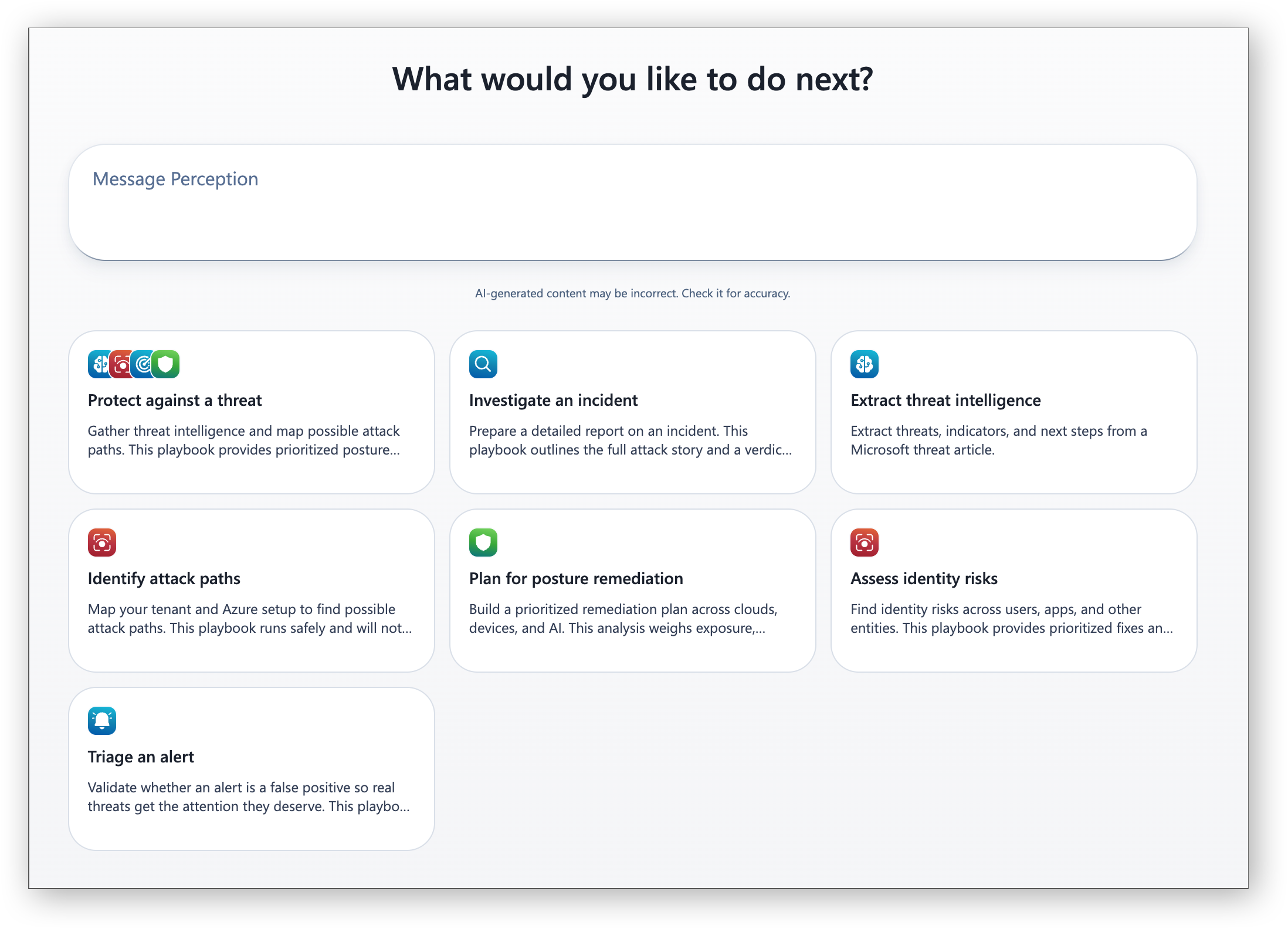 Microsoft Perception Playbooks
Project Perception is in public preview right now, so check it out. Do note it’s technically a ‘limited’ public preview, so you might have to be a bit patient before you can get in. In the meantime the introduction video in the link below has some very cool demos.
Links
- Introducing Project Perception
- Rethinking security for the age of AI (official Microsoft blog)
- Introducing MAI-Cyber-1-Flash inside MDASH (Microsoft AI)
- Microsoft’s New In‑House AI Models (MAI‑Transcribe, MAI‑Voice, MAI‑Image)
Community Project
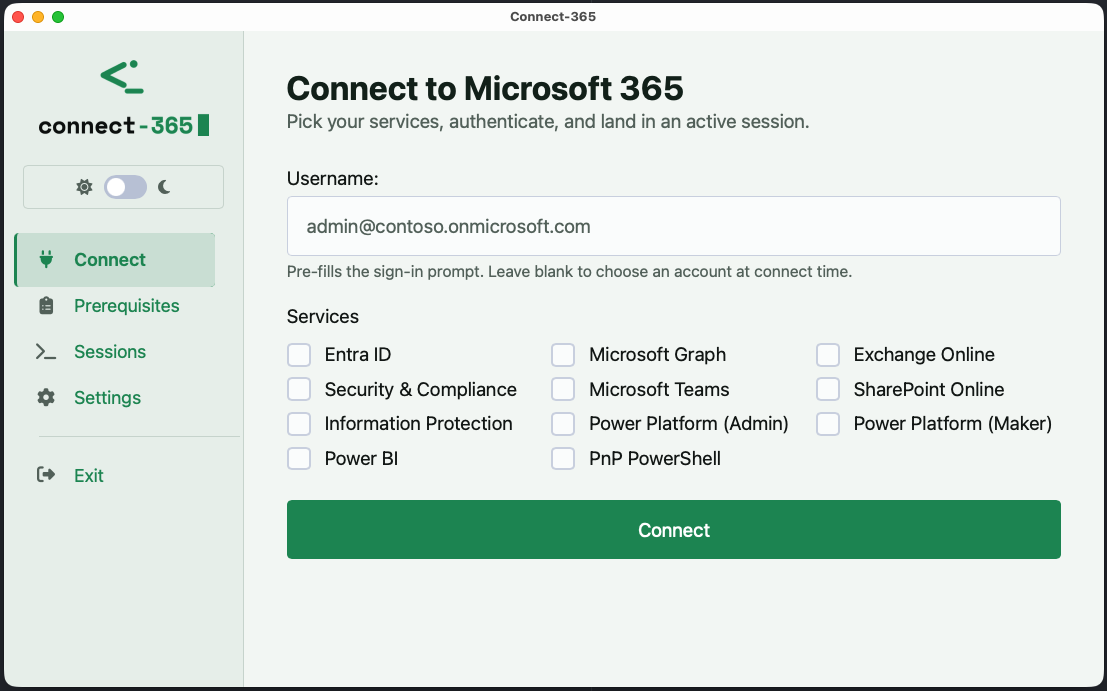
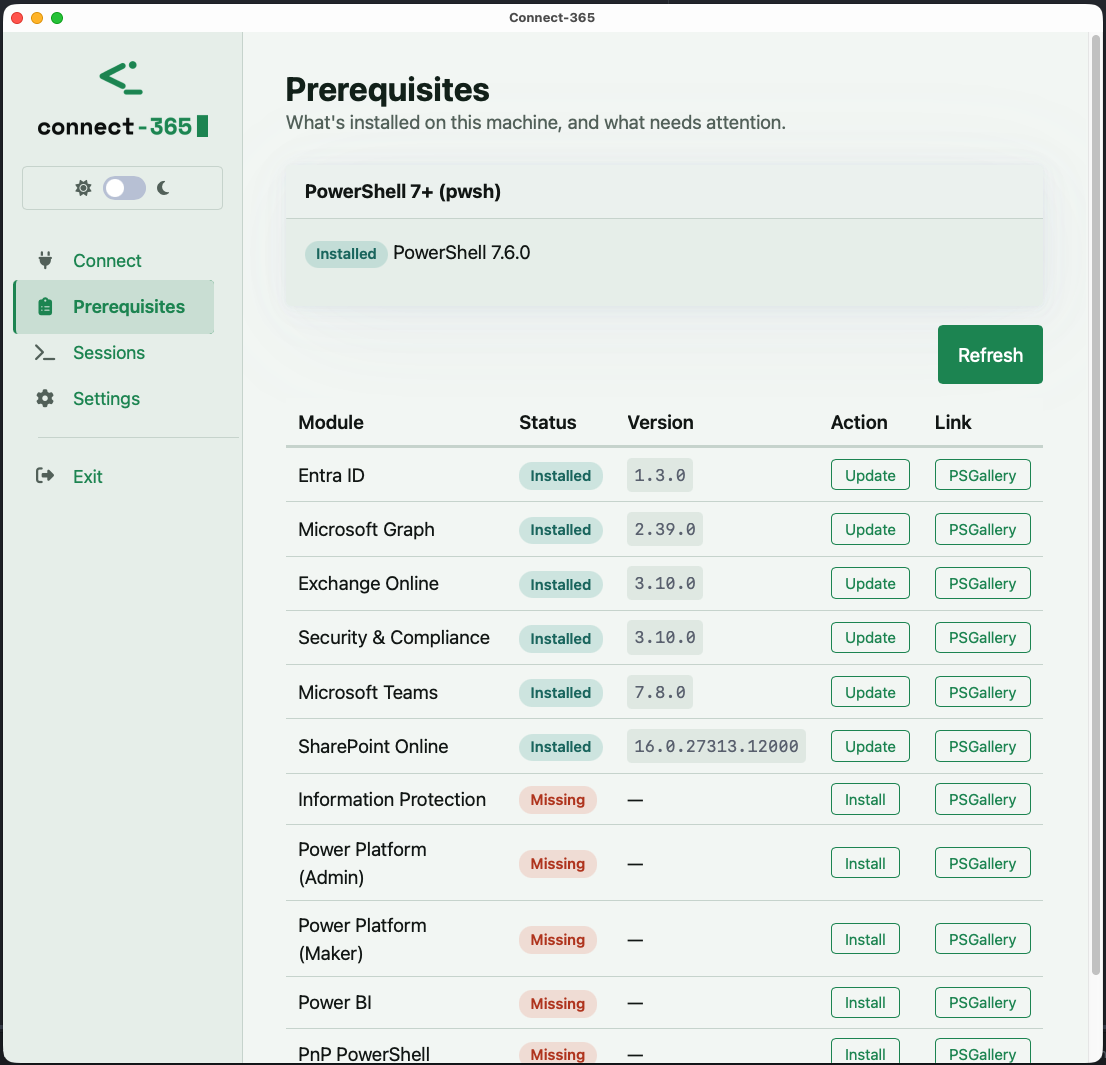
For those who don’t know the history: back in 2012, I put together a basic script with a GUI to simplify connecting to Exchange Online via remote PowerShell. After a couple of years I realized it had been shared with so many colleagues and clients that I decided to clean it up and publish it on the TechNet Gallery. Over the years it became known as Connect-365, and when the TechNet Gallery shut down I moved the project to GitHub. The script itself features a GUI that prompts for your tenant credentials and then connects to various Microsoft 365 services using remote PowerShell. A built-in prerequisite checker ensures the correct modules are installed and provides a download link for those that are not. This original PowerShell version still exists today, but it hasn’t had many updates in recent years and I’ve been planning a refresh for some time. So today I wanted to drop a bit of a preview of the next version of Connect-365, this time as a cross-platform app.
I’ve updated the module list to include the following:
| Display Name | Module Name | Connect Cmdlet |
|---|---|---|
| Entra ID | Microsoft.Entra |
Connect-Entra |
| Microsoft Graph | Microsoft.Graph |
Connect-MgGraph -Scopes @(...) |
| Exchange Online | ExchangeOnlineManagement |
Connect-ExchangeOnline |
| Security & Compliance (Purview) | ExchangeOnlineManagement |
Connect-IPPSSession |
| Microsoft Teams | MicrosoftTeams |
Connect-MicrosoftTeams |
| SharePoint Online | Microsoft.Online.SharePoint.PowerShell |
Connect-SPOService -Url <admin URL> |
| Information Protection (AIP) | AIPService |
Connect-AIPService |
| Power Platform (Admin) | Microsoft.PowerApps.Administration.PowerShell |
Add-PowerAppsAccount |
| Power Platform (Maker) | Microsoft.PowerApps.PowerShell |
Add-PowerAppsAccount |
| Power BI | MicrosoftPowerBIMgmt |
Connect-PowerBIServiceAccount |
| PnP PowerShell | PnP.PowerShell |
Connect-PnPOnline -Url <url> -Interactive |
One of the new features that I’m really excited about is ‘quick scopes’ for Graph. No more guessing what access you need for certain tasks; I’ve pre-configured the following:
| Profile | Scopes |
|---|---|
| User Administration | User.ReadWrite.All, Group.ReadWrite.All, Directory.Read.All |
| Identity & Access | Policy.ReadWrite.ConditionalAccess, Policy.Read.All, RoleManagement.ReadWrite.Directory |
| Device & Intune | DeviceManagementManagedDevices.ReadWrite.All, DeviceManagementConfiguration.ReadWrite.All |
| Applications | Application.ReadWrite.All, AppRoleAssignment.ReadWrite.All |
| Reports & Audit | AuditLog.Read.All, Reports.Read.All, Directory.Read.All |
I’m still working through a few bugs and issues, but with a little luck, by the time you’re listening to this you’ll be able to take it for a test drive yourself. Once released, it will be available on GitHub: Connect-365