02x09-logic_apps_left_the_chat.json
In this episode, Koos has been building Microsoft Sentinel playbooks in Azure Logic Apps for years. Recently he spent quite some time with n8n for several customers and it’s on a different level. He talks about what he’s been missing in Logic Apps, what he built with n8n, what it costs, and what Microsoft itself is doing with AI-generated playbooks in Sentinel. And Chris looks at the Microsoft Entra dynamic groups and discusses some recent changes everyone should be aware of.
Logic Apps left the chat
If you’ve done anything with Microsoft Sentinel automation, you’ve built playbooks in Azure Logic Apps. I’ve built a lot of them over the years: enrichment, notifications, ServiceNow integrations, isolating devices, disabling accounts. And to be fair: Logic Apps and Sentinel are very neatly integrated. An automation rule fires, your playbook gets the incident, permissions are handled with a managed identity and the ‘Microsoft Sentinel Automation Contributor’ role, and off you go. That part is easy and accessible, and I still think it’s a strength. If you’re new to workflow automation it’s also an easy way to start; you don’t have to host anything yourself.
But over the last months I’ve spent a lot of time with n8n for several customers, and as a workflow tool it’s on a totally different level. This isn’t a 100% Microsoft topic, but there is a Microsoft angle at the end.
First things first: how do you even say it? I was tempted to go with ‘Nathan’. It’s a numeronym, the same trick as ‘K8s’ for Kubernetes or ‘i18n’ for internationalization. First letter, the number of letters you skipped, last letter. The README says it’s pronounced “n-eight-n”. I’ll try to stick to that.
What annoyed me about Logic Apps
Let me get this off my chest first. My biggest frustration has always been debugging. You build something, you trigger it on a real incident, you wait, you open the run history, and you click through the actions one by one to look at the JSON. Then you fix one expression and do it all over again. It’s a LOT of trial-and-error.
Microsoft did add “Submit from this action” to the run history, so you can resubmit a run from a specific action and reuse the earlier inputs. But check the limitations. It only works for sequential workflows. It isn’t available for anything inside a For each or Until loop, and not for actions inside Condition or Switch branches. And the workflow needs 40 actions or less. A Sentinel playbook is basically a For each over entities with a few conditions inside. So in practice the option is greyed out for exactly the actions you want to retry. The resubmitted run also uses the same workflow version as the original, so you can’t fix your expression and replay the old data against it.
Then there’s the designer itself. You can’t easily drag and drop actions around. Move something and a lot of custom expressions break, or the designer doesn’t even allow the move in the first place. So you think: fine, I’ll do it in code view. Good luck. Every action has a runAfter object that references the previous action by name, and after a bit of rearranging you’ll be fixing broken references and incorrect ‘run after’ properties for a while.
Versioning is another one. There is a version history, but it’s not easy to go back in time and compare different edits. And Infrastructure-as-Code is quite a pain. To deploy a playbook via ARM or Bicep you either put the entire workflow definition inside the template (as one big concatenated JSON string) or you build some creative deployment scripts around it. Using parameters to switch a few simple things around for different environments or customers, which is exactly what you want as an MSSP, becomes much harder than it should be.
None of this is new. I’ve lived with it for years and you get used to it.
What I built with n8n
Some of the things we moved to n8n recently:
- Tier-1 identity triage, fully automated, for both on-premises Active Directory and Entra ID identities. The stuff an analyst used to do by hand as the first step on every identity-related incident.
- IP enrichment on every incident that contains an IP address: IPinfo, AbuseIPDB and a couple of others, to determine the country of origin, whether it’s a Tor or VPN exit, and whether it matches any of our TI indicators. This is a rework of what we had before.
- Automatic labeling of incidents so they land correctly in ITSM integrations like ServiceNow.
- AI-enriched customer communication. Alerts from Defender EASM or from network appliances like Palo Alto and Fortinet can be quite cryptic: the name of an attack, or just a CVE number. Our Azure AI Foundry instance now adds context: what kind of attack is this alert actually referencing, and which remediation steps would you most likely take first. That goes into the communication towards the customer.
What n8n does differently
This is where the quality-of-life stuff comes in. None of it is rocket science.
Pin data and re-run a single node. You execute a node once, pin its output, and from then on every test run uses the pinned data instead of calling the API again. So you fix your expression, run just that one node, look at the output, fix again. No re-triggering the whole flow and waiting for a new incident. Pinning is a development feature; pinned data isn’t used in production executions.
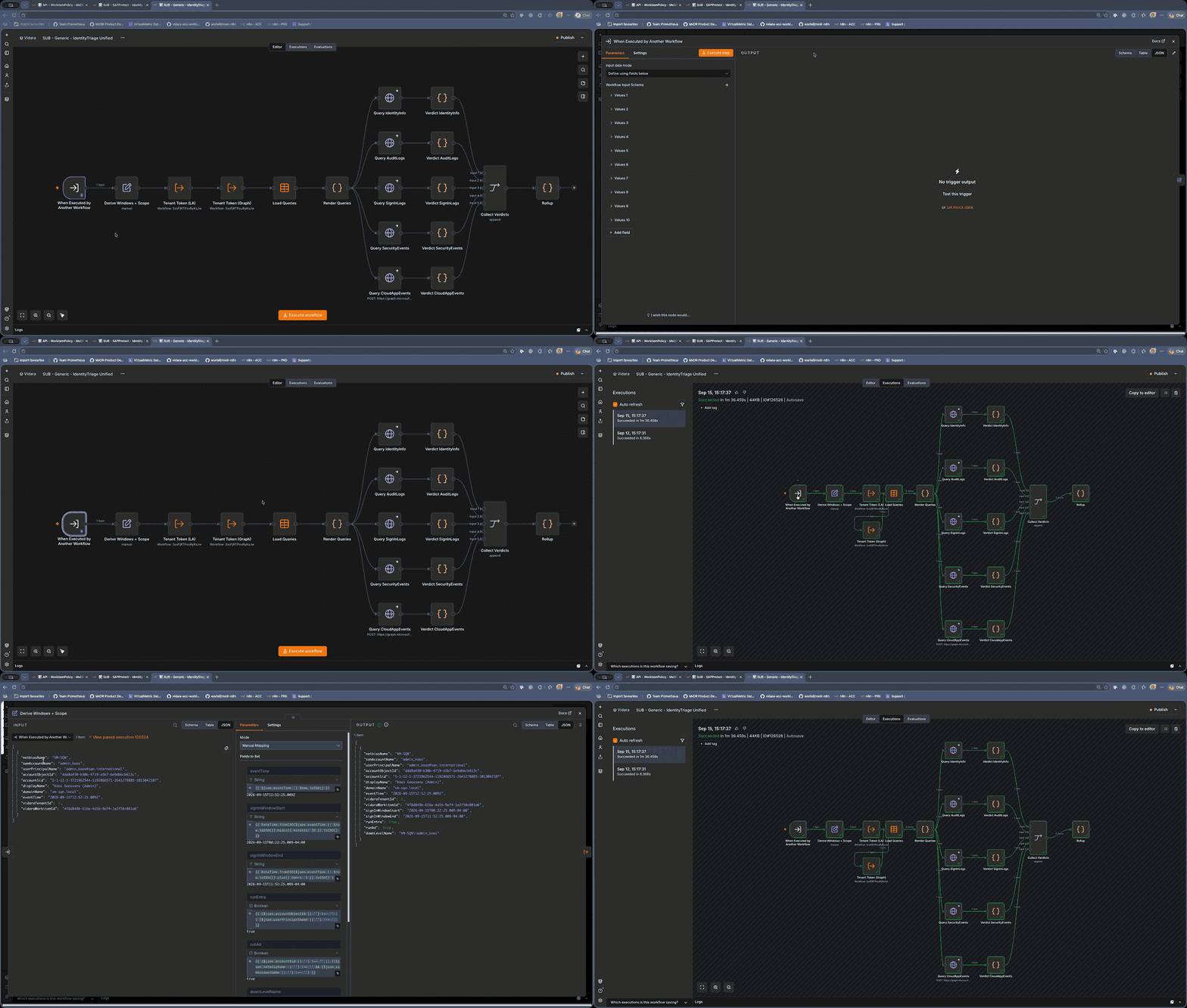 Pinned input on the ‘When Executed by Another Workflow’ trigger, then stepping through the execution node by node
Executions you can actually read. Every execution shows the whole canvas with the data that flowed through each node. Click a node and you see input and output side by side. Every node also has its own ‘Retry On Fail’ settings (how many tries, how long to wait in between). And you decide per node what happens on an error: stop the workflow, continue, or continue via a separate error output so you can handle it in the flow. On top of that you can point a workflow at an error workflow. That’s a workflow starting with the ‘Error Trigger’ node, and it receives the execution id, the node that failed and the error message. One error workflow can serve all your other workflows.
Moving things around is free. Expressions reference other nodes by name, and if you rename a node n8n updates those references for you. Drag a node somewhere else on the canvas and nothing breaks; the position has nothing to do with the execution order. Rewiring is dragging a connection.
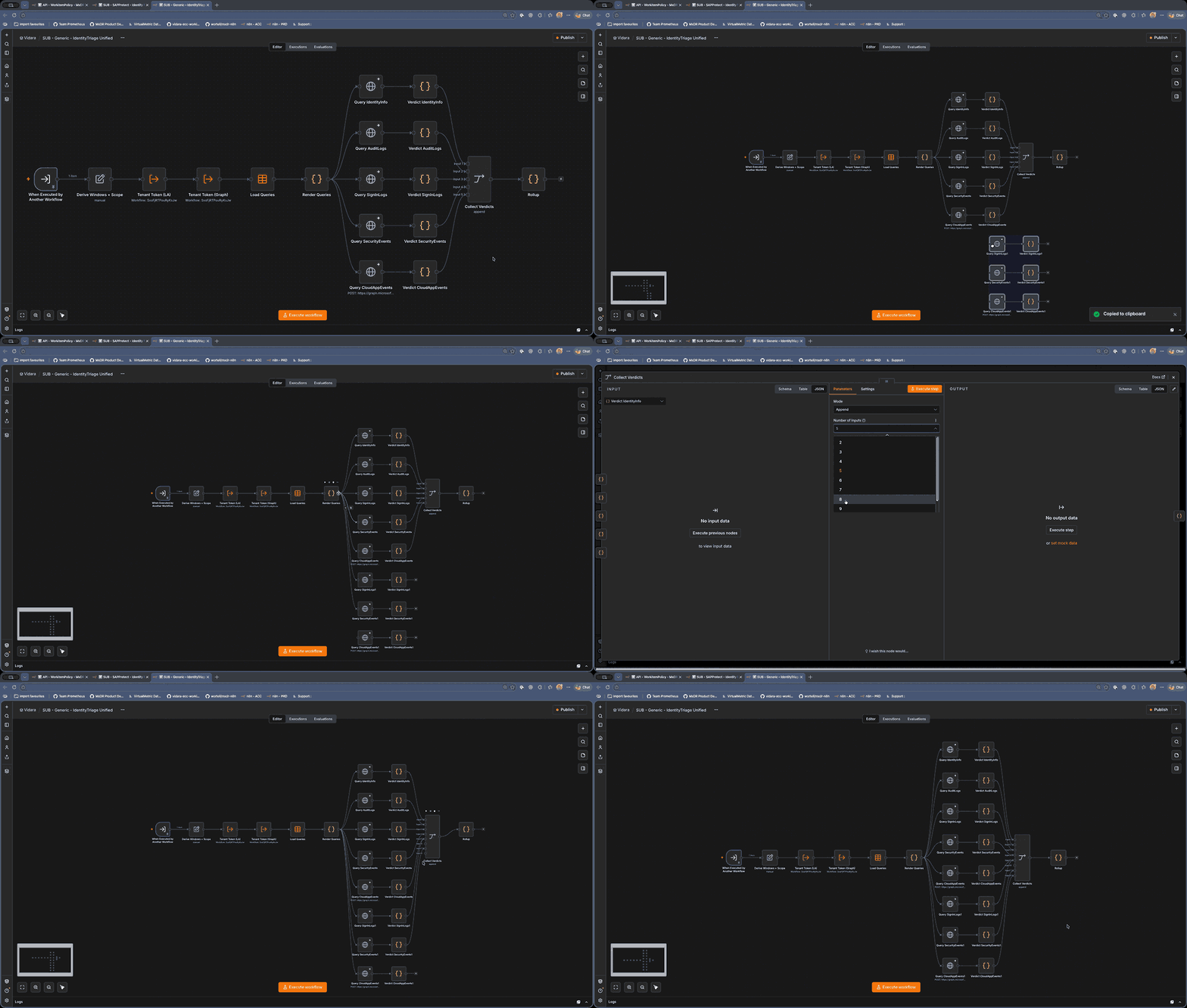 Copy, paste and rewire a whole block of nodes in the identity triage sub-workflow; nothing breaks
Sub-workflows. The ‘Execute Sub-workflow’ node calls another workflow. That workflow starts with a ‘When Executed by Another Workflow’ trigger and its last node returns the data. So something like the IP enrichment becomes one sub-workflow that every other workflow can call, and you only have to fix it in one place. Nice detail: sub-workflow executions don’t count towards your plan’s execution limit on n8n Cloud.
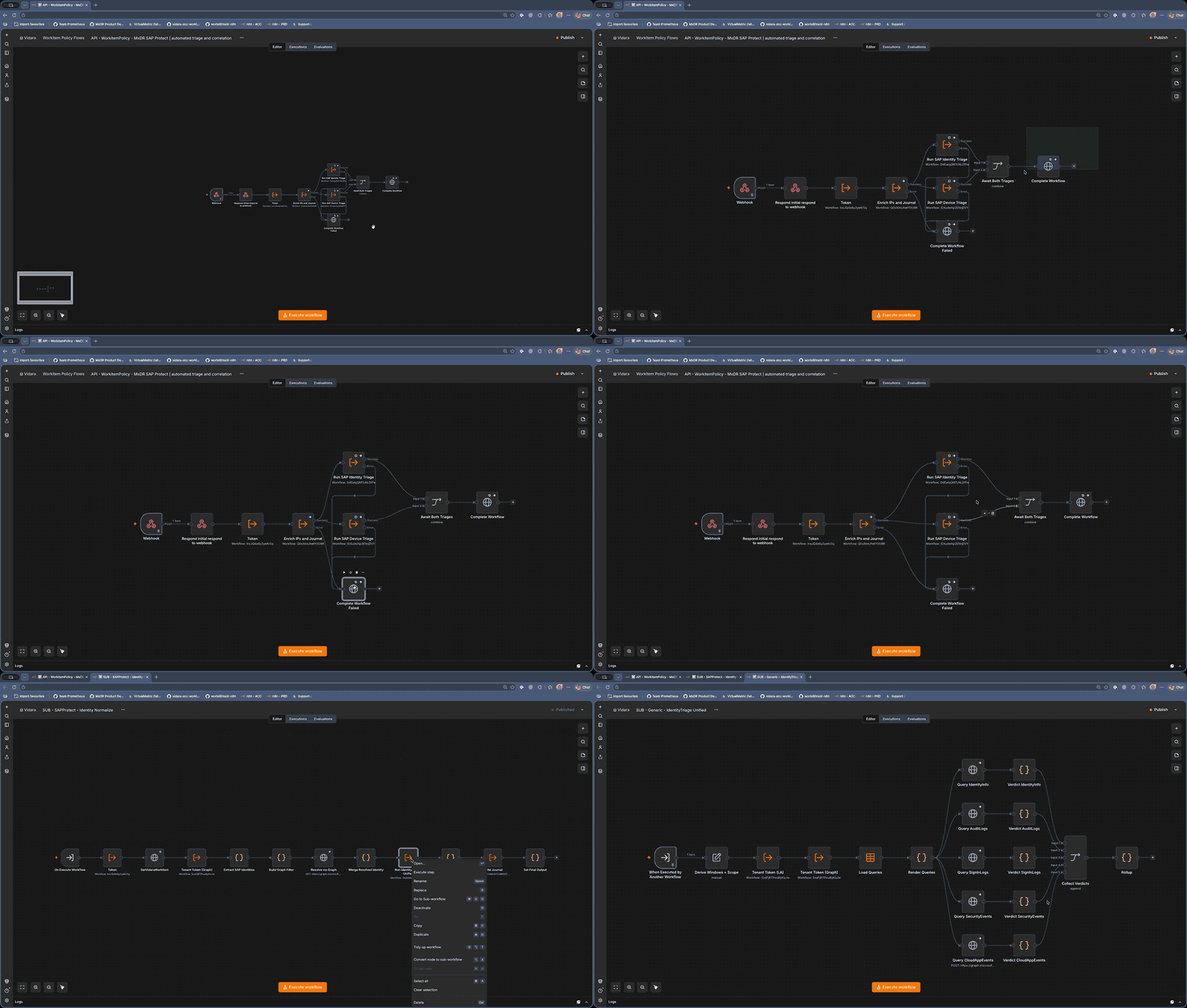 A triage workflow calling the identity and device triage sub-workflows; right-click a node to jump into the sub-workflow
AI agents as a node. The ‘AI Agent’ node takes a chat model, optional memory and a set of tools. Tools can be built-in integrations, an HTTP request, another workflow, or an MCP server. For the customer communication the model behind it is our Azure AI Foundry deployment. It works the other way around as well: the ‘MCP Server Trigger’ node exposes your n8n workflows as MCP tools, so an agent (or Claude, or Copilot Studio) can call your enrichment workflow directly. I’ll admit I still have some homework left there.
Self-hosting, git and environments. n8n runs as a single Docker container next to a Postgres database, so self-hosting is a small job. The paid plans add ‘Source control’: you link an instance to a git repository and a branch, push from your development instance and pull into production. Combined with variables this fixes the ‘few parameters per environment or customer’ problem I had with ARM templates. Workflow history is there as well, with retention depending on your plan. Do note that git version control, environments and variables aren’t in the free Community edition; more on that below.
Getting incidents in and out
Logic Apps wins on integration though. You create an automation rule, select the playbook and you’re done. With n8n you have to create that plumbing yourself. There are two options I’d expect most of you to pick from:
- Automation rule –> thin Logic App –> n8n webhook. Keep a tiny Logic App playbook with the incident trigger and a single HTTP action that POSTs the incident to an n8n ‘Webhook’ node. Sentinel still does the triggering and the permissions, n8n does the work. The Logic App never changes again, which by itself solves most of the gripes above.
- n8n pulls from Microsoft Graph. A ‘Schedule Trigger’ that calls
GET /security/incidentswith a filter onlastUpdateDateTime, and takes it from there. No Logic App at all. This is the one we use ourselves.
At Wortell we have a third option: Vidara, our in-house application for incident response. It’s the single incident queue our analysts work from across all customers. It was born in the early days from the lack of multi-tenant support in Sentinel and expanded over the years with hunting, automation and enrichments. That’s very MSSP-specific though, so I’ll leave it there.
For the way back we write to the incident via Graph: PATCH /security/incidents/{id} for tags, classification, determination and status, and the comments endpoint for the enrichment results. The application permission you need is SecurityIncident.ReadWrite.All.
You could also use the Sentinel REST API (the Azure Resource Manager side, Microsoft.SecurityInsights). But let me take this moment to say something: I don’t think you want to depend on Sentinel as an Azure resource too much any longer. Microsoft Sentinel in the Azure portal will no longer be supported after March 31, 2027. After that the Defender portal is the only experience. Microsoft’s own transition guide says the Sentinel API keeps working for Sentinel resources like analytics rules and automation rules. For incidents and alerts they recommend the Graph API. Nobody knows for sure what happens to the ARM APIs for incidents in the long run. My guess is they’ll keep working for a good while. But I wouldn’t want to depend on it, and we’ve switched everything to Graph.
What does it cost?
n8n bills per execution: one execution is one run of your entire workflow, regardless of how many steps it has or how much data it processes. That’s the big difference with Logic Apps, which bills per action. Current n8n pricing (billed annually):
| Plan | Hosting | Price | Executions / month | Notable |
|---|---|---|---|---|
| Community | Self-hosted | Free | Unlimited | No variables, environments, git, SSO, projects or log streaming |
| Starter | n8n Cloud | € 20 / month | 2.500 | 5 concurrent executions, 1-day workflow history |
| Pro | n8n Cloud | € 50 / month | 10.000 | 20 concurrent, global variables, workflow history, execution search, admin roles |
| Business | Self-hosted | € 667 / month | 40.000 | SSO/SAML/LDAP, git version control, 2 environments |
| Enterprise | Cloud or self-hosted | Custom | Custom | 200+ concurrent, external secrets, log streaming, SLA |
For comparison, Logic Apps Consumption in West Europe: built-in actions are $ 0,000025 each (the first 4.000 per month are free), standard connector actions $ 0,000125 and enterprise connector actions $ 0,001. So a 30-step playbook with 10 standard connector calls, running on 5.000 incidents a month, costs you roughly $ 9. To be fair: Logic Apps compute is cheap, and for a handful of playbooks it stays cheaper than any paid n8n plan. What you save with n8n is time, not Azure costs. And the AI Foundry tokens are a separate bill in either case.
One thing to know if you go the free self-hosted route as a service provider: the Community edition comes under n8n’s ‘Sustainable Use License’. Internal business purposes are fine, so running it for your own SOC is fine. But “you may distribute the software or provide it to others only if you do so free of charge for non-commercial purposes.” Hosting n8n for your customers as a paid service isn’t covered; that’s what the Business and Enterprise plans are for. I’m not a lawyer, so read it yourself before you build a business on it.
And where does the data go?
Something our EU listeners will want to know before anything else. n8n is a German company, n8n GmbH in Berlin. If you self-host (Community, Business or Enterprise) the question is easy: the data goes wherever you put it, and Enterprise even supports air-gapped installs.
For n8n Cloud the situation today is also pretty good. According to n8n’s security page the hardware and the data are “currently hosted in the European Union”, on Microsoft Azure. The sub-processor list names Azure in Germany and Sweden, plus Hetzner in Germany. Backups are replicated to a separate region within the same country. There’s no region picker at the moment. So you can’t choose, but you also can’t end up outside the EU by accident. n8n says they’re preparing additional locations, so check again when you sign up.
Two things to keep in mind. First, the same sub-processor list has US parties on it: OpenAI, Anthropic, LangChain and a sandbox provider. Those are for n8n’s own AI features, like the AI Assistant in the editor and the AI credits included with the Cloud plans. That’s separate from what your workflows do: if your AI Agent node points at your own AI Foundry deployment in West Europe, that’s where your prompts go. Second, the paperwork is there: a DPA, GDPR in the trust center, SOC 2 Type II audits (the report is for enterprise customers, a SOC 3 is public), and AES-256 encryption at rest on Cloud.
For comparison: Logic Apps runs in the Azure region you pick and falls under Microsoft’s EU Data Boundary. n8n Cloud doesn’t have a formal boundary like that, just the current hosting in the EU. If that matters for your customers, self-hosting is the safer choice.
Generating playbooks with AI in Sentinel
Now the Microsoft angle. Logic Apps are easy to build and the Sentinel integration is great, so I was curious what Microsoft itself is working on for playbooks.
Microsoft Sentinel can now generate playbooks with AI. It went into public preview in February 2026 and became generally available in May 2026. What surprised me: it doesn’t generate Logic Apps. The playbook generator creates Python-based playbooks, co-authored with Cline (an AI coding agent) in a VS Code environment embedded in the Defender portal. You describe your automation in natural language and review the plan and the flow diagram. Then you switch to ‘Act mode’ and it writes the code and the documentation, and runs a test against a real alert. No Security Copilot license or SCUs required.
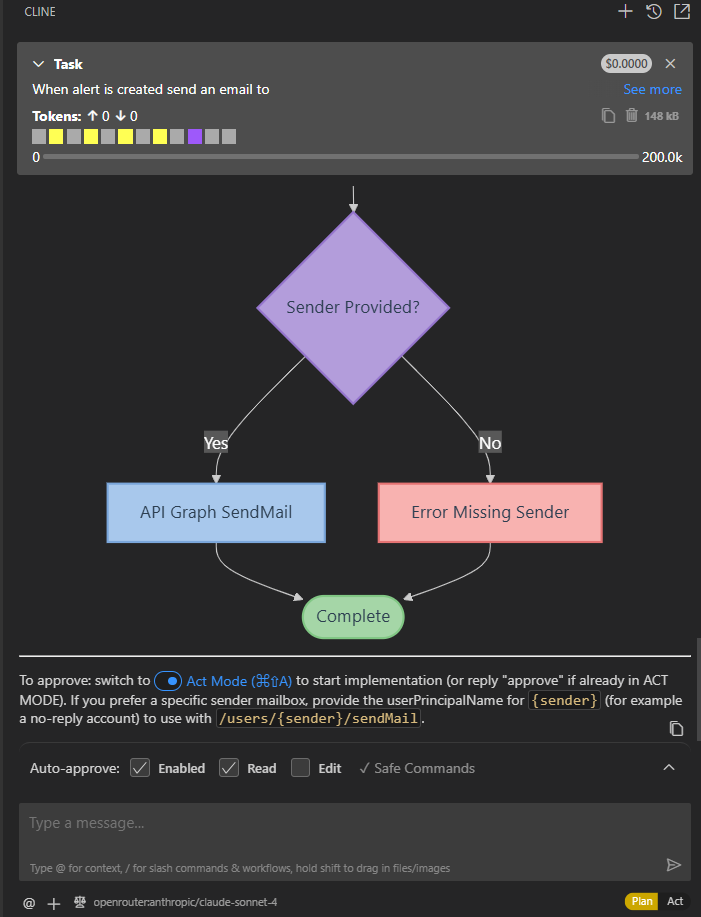 Plan mode: Cline proposes a flow diagram and you approve by switching to Act mode
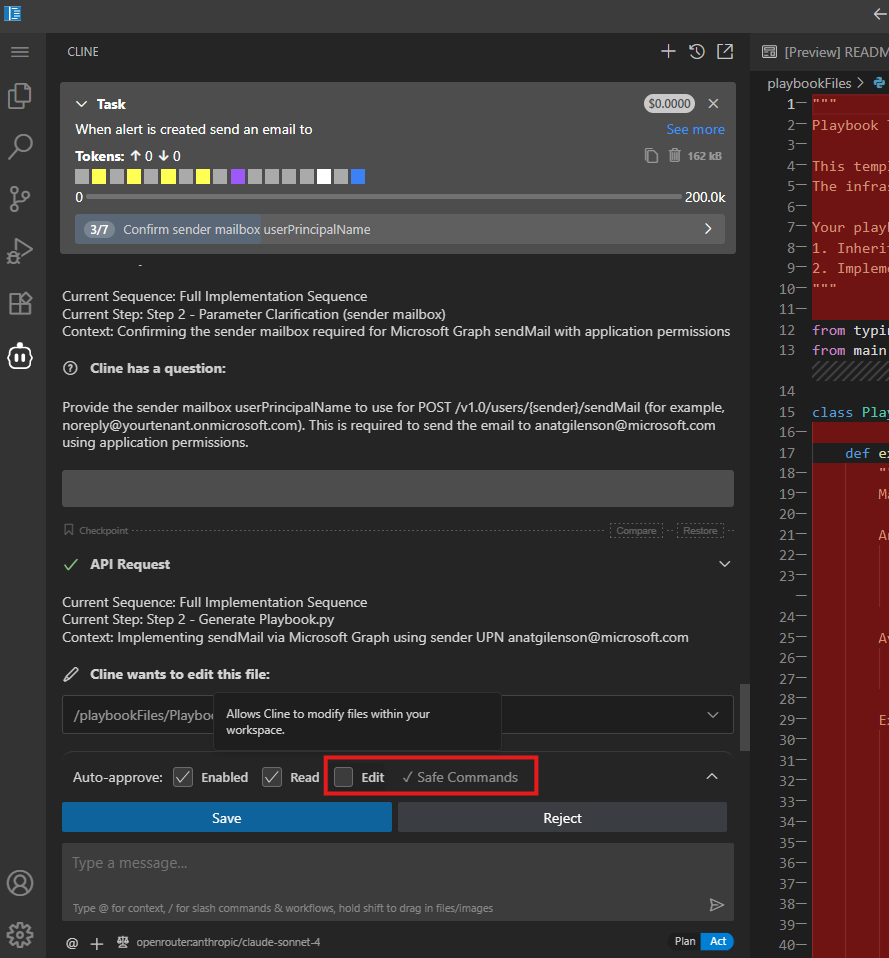 Act mode: Cline asks for the sender mailbox and wants to edit Playbook.py; tick ‘Edit’ under Auto-approve to stop the prompts
Integrations work through ‘integration profiles’: a base URL, an authentication method (OAuth2 client credentials, API key, bearer and a few more) and credentials. You manage them centrally under Automation. Even the Graph integration isn’t there by default; you register an app and create the profile yourself. Generated playbooks run via a new ‘Enhanced Alert Trigger’, which works at the tenant level across workspaces.
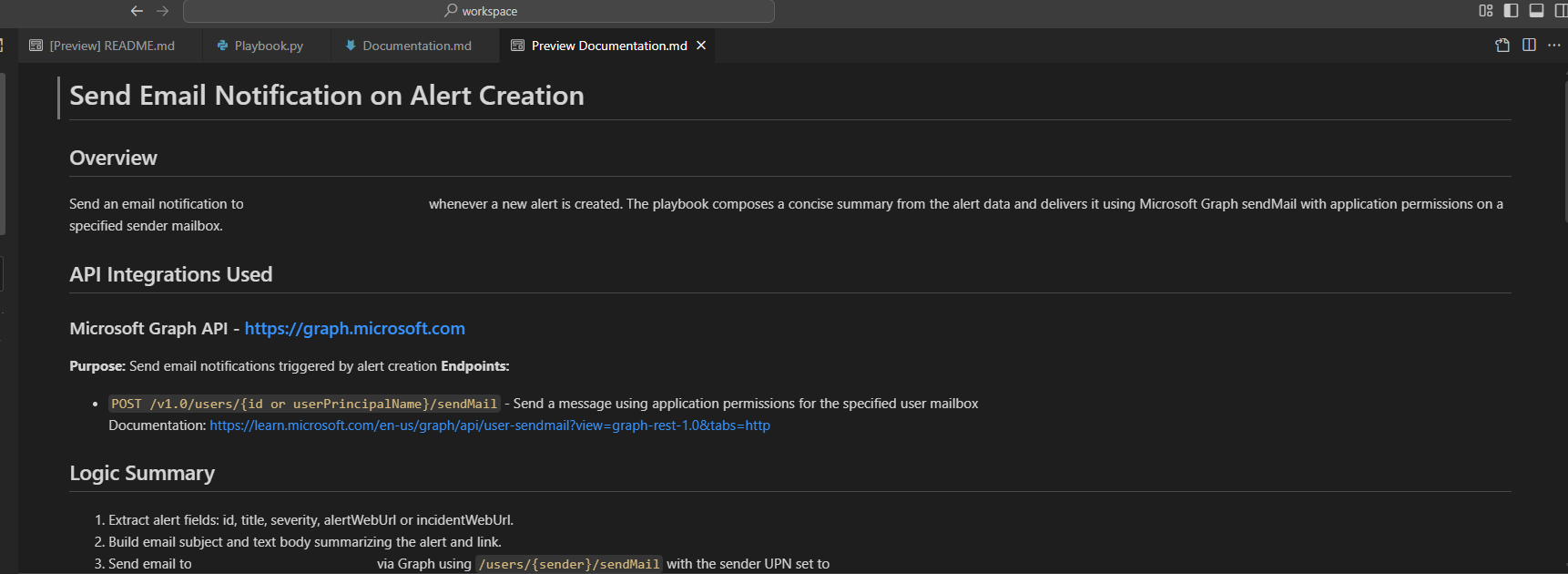 The generated documentation, including the Graph endpoint the playbook is going to call
So Microsoft didn’t change the Logic Apps designer. They added a second option next to it, in code, with an AI writing that code. I think that’s telling. Logic Apps stays the easy way in, and for the more complex playbooks you move to code. That’s also where I ended up with n8n.
The GA version still has some limits worth knowing:
- Alerts are the only input. No incident trigger, no entity trigger.
- Python only, and no external libraries.
- A playbook can’t call another playbook.
- Up to 100 playbooks per tenant, 5.000 lines each, 10 minutes maximum runtime.
- 8 million AI tokens per day per tenant.
- No automatic code validation. To quote the docs: “Users must manually verify correctness.”
- Enhanced Alert Trigger rules live in a separate automation rules table, without priority ordering or expiry dates, and with one action per rule.
- Runs only show up in the incident’s Activity tab, not in the SentinelHealth table.
Try it, but read the code before you enable a playbook. There’s no validation, so that’s on you.
Links
- n8n pricing
- n8n Sustainable Use License
- n8n security: Cloud hosting location and encryption
- n8n sub-processors
- Azure Logic Apps pricing
- Logic Apps: rerun a workflow from a specific action
- Generate playbooks using AI in Microsoft Sentinel
- Microsoft Sentinel in the Azure portal retirement timeline
- Transition your Microsoft Sentinel environment to the Defender portal
- Microsoft Graph: Update incident
Entra Dynamic Groups
Dynamic groups - we all use them, we all set them up and then forget about them because they just work. There are three recent changes that mean we really should pay more attention to them. ‘MemberOf’ is going away in November, AI agents can now land in your groups, and the attributes behind your rules might be easier to change than you think. Let’s dig into it.
MemberOf is retiring (and it won’t tell you)
‘MemberOf’ was the closest thing Entra ID had to nested groups. After four years in public preview, Microsoft is retiring it on 3 November 2026 (MC1448379).
What happens on the day
- Dynamic groups, dynamic administrative units, and entitlement management auto-assignment policies that use MemberOf stop updating.
- Nothing is deleted and nothing errors. Membership just stays at its last known state.
- New joiners don’t get added. Leavers don’t get removed.
What that affects
- Group-based licensing (unlicensed or over-licensed users)
- Conditional Access policies targeting those groups
- Teams and SharePoint access through Microsoft 365 groups
- Access package assignments
- Scope of dynamic administrative units
Why Microsoft is retiring it
Even one ‘MemberOf’ rule can affect dynamic membership processing across the whole tenant. Microsoft says it’s working on an alternative, but hasn’t said what or when.
Find your exposure
Connect-MgGraph -Scopes "Group.Read.All","AdministrativeUnit.Read.All"

# Dynamic groups using MemberOf
Get-MgGroup -All -Filter "groupTypes/any(c:c eq 'DynamicMembership')" `
    -Property Id,DisplayName,MembershipRule -ConsistencyLevel eventual -CountVariable n |
    Where-Object { $_.MembershipRule -match 'memberof' } |
    Select-Object DisplayName, Id, MembershipRule

# Dynamic administrative units using MemberOf
Get-MgDirectoryAdministrativeUnit -All -Property Id,DisplayName,MembershipType,MembershipRule |
    Where-Object { $_.MembershipRule -match 'memberof' } |
    Select-Object DisplayName, Id, MembershipRule
Don’t forget to check entitlement management auto-assignment policies as well.
What to do about it
- Inventory every ‘MemberOf’ rule: groups, admin units, and access package policies.
- Check what each group actually controls (licenses, CA, apps, Teams).
- Rewrite the rule using supported attributes where you can.
- Where you can’t, switch to assigned membership or another process.
- Check access and licensing afterwards, before 3 November, not after.
Tip: While you’re in there, check the groups each rule references still exist. A MemberOf rule pointing at a deleted group keeps running on whatever groups are left, with no warning.
Agent users can join your dynamic groups
In Entra, an agent’s user account is a type of user identity, so user-based membership rules evaluate it like any other user. If it matches the rule, it joins the group and inherits whatever that group grants.
Why it matters
- Broad rules (all members, a department, a country) can include agents without the group owner noticing.
- The agent then picks up licences, app assignments, or Microsoft 365 group resources.
- Agent users can’t be added to role-assignable groups, which blocks one privilege path. Ordinary security groups can still grant plenty of access.
The gap
Microsoft’s guidance says to add a condition that excludes (or targets) agent user accounts, but at the time of recording there’s no documented property or example syntax for it. Don’t put a guessed exclusion into production.
What to do about it
- Review dynamic groups with very broad rules, especially ones used for app access or licensing.
- Know which agent identities exist in your tenant, and who is creating them.
- Watch for Microsoft to publish supported syntax, and test it with the rule validator before relying on it.
A dynamic group is only as secure as its attributes
Microsoft’s dynamic membership docs now say it directly: the security of a group’s membership depends on who can change the attributes the rule references, both in Entra ID and in any connected source directory.
Where this goes wrong
- Guests: by default, users can invite guests, and a guest’s UPN comes from an email address the inviter chooses. A rule like
user.userPrincipalName -contains "supportxyz"can be matched just by invitingsupportxyz123@gmail.com. - Hybrid identity: attributes synced from on-premises AD may allow users to edit their own values (SELF write). If a rule uses one, a user can add themselves to the group.
- Delegated admins: anyone with rights to edit department, job title, or extension attributes can effectively manage membership of every group using those attributes.
What to do about it
- Build rules for access-controlling groups on attributes that only admins or your HR system can write.
- Avoid
-contains/-matchon UPN, mail, or display name for anything sensitive. - Exclude guests explicitly:
(user.userType -eq "Member"). - Audit write permissions on synced attributes in on-premises AD, not just in Entra.
- Restrict guest invitations to specific admin roles where you can.
Links
MemberOf retirement
- MC1448379: Replace MemberOf rules by November 3, 2026
- Microsoft Learn: MemberOf operator (preview) and migration guidance
- Office 365 for IT Pros: MemberOf Rule Operator Retired from Entra ID
- LazyAdmin: Microsoft Entra ID Is Retiring the MemberOf Rule
Agent users & attribute security
- Microsoft Learn: Manage rules for dynamic membership groups
- Merill Fernando: Entra agent users can join your dynamic groups
- Tenable: Dynamic Group Featuring an Exploitable Rule
Community Project
DCToolbox
DCToolbox is a free, open-source PowerShell module from Microsoft MVP Daniel Chronlund, built for people working on Microsoft 365 security. It gathers tools for Entra ID, Microsoft Graph, Conditional Access, and attack-and-defence testing into one module. If you’ve followed Daniel’s Conditional Access baseline work, this is where a lot of it becomes usable.
Conditional Access, done properly The strongest part of the toolbox is its Conditional Access tooling:
- Deploy a baseline:
Deploy-DCConditionalAccessBaselinePoCdeploys Daniel’s full Conditional Access baseline, including exclusion groups, named locations, and terms of use, with every policy in report-only mode. - Pick from a gallery:
Invoke-DCConditionalAccessGallerylets you choose individual policies from a set of templates. It creates any missing dependencies and produces Markdown documentation. - Conditional Access as code: export all policies to JSON for backup or documentation, then import them into another tenant.
- Simulate a sign-in:
Invoke-DCConditionalAccessSimulationshows which policies would apply for a given user, app, platform, country, and risk level. It can also run offline against a JSON export. - Manage in bulk: switch policies between a pilot group and All users, or between report-only and enabled, using name prefixes as a safety filter. You can also exclude a break glass group from every policy in one command.
- Report: generate Excel reports of your policy design and of which users and groups each policy targets.
Entra ID hygiene
New-DCEntraIDAppPermissionsReportlists enterprise apps and app registrations with application permissions, their secrets and certificates, and their owners. Use it to find over-permissioned or poorly protected apps.New-DCEntraIDStaleAccountReportfinds members and guests who haven’t signed in for a set number of days, and can include their group memberships.Enable-DCEntraIDPIMRoleactivates one or more PIM roles from PowerShell.Invoke-DCHuntingQueryruns KQL advanced hunting queries in Defender XDR through Graph.
See your tenant the way an attacker does Daniel includes several proof-of-concept tools that show what goes wrong when a tenant is poorly configured:
- Unauthenticated user enumeration, and checks for easily guessed admin account names
- Device code flow token capture
- Bulk file exfiltration, or wiping, through an over-permissioned app registration
- Deleting every Conditional Access policy in a tenant
These are for lab tenants and authorised testing only. They’re a very effective way to show a client or your leadership why app permissions and CA hygiene matter.
Getting started
Install-Module DCToolbox
Get-DCHelp        # list the available tools
Copy-DCExample    # copy ready-made script examples to your clipboard
A few commands need an app registration with Graph permissions, and the Excel reports use the ImportExcel module. The README covers the requirements for each command.