02x02_you_shall_not_pass.key
In this episode, Chris take a look at PowerShell modules and how managing M365 and Entra ID has changed over the years. And Koos likes to re-visit Passkeys. This is not new and we covered it earlier in our very first episode in December of 2024. But quite a few things have changed since then and he believes now is the time to start onboarding at scale.
Module Wars
The History Lesson
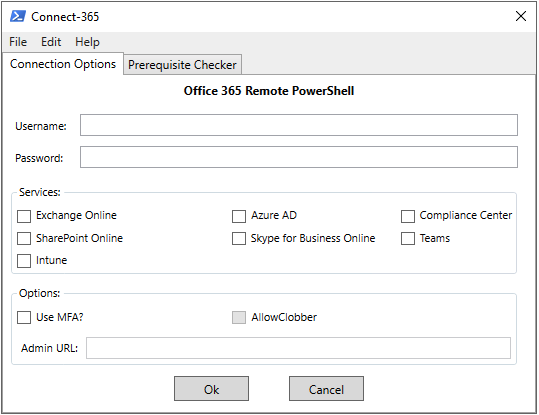
A long time ago in a galaxy far, far away… back in 2012, I put together a basic script with a GUI to simplify connecting to Exchange Online via remote PowerShell. I had never intended to make the script publicly available and it was just something I used myself. After a couple years I realized that it had been widely shared so I decided to clean it up and publish it on the TechNet gallery. Connect-EXO was born and over the years it matured into what is called Connect-365 today.
In 2020 the Microsoft Graph PowerShell SDK (providing -Mg cmdlets) appears publicly and slowly Microsoft started to moving away from the older modules towards Graph. Microsoft officially deprecated the MSOnline, AzureAD, and AzureADPreview PowerShell modules in March of 2024 - these modules entered deprecated status meaning no new features and only critical fixes available. These modules no longer work today. Personally I think adoption of Microsoft.Graph was slow, mostly due to complexity, but also because of feature parity and the heavy investment many folks had in scripts and automation that used the older MSOnline and AzureAD modules.
Why do we care?
I’ve recently been thinking about this quite a bit - partly because I’ve been looking at updating ‘Connect-365’ to stay current and partly because I’ve heard a lot of myths and incorrect info about the current state of PowerShell management. So what is the answer? Just manage everything with Microsoft.Graph right? As with most things, the answer isn’t quite that simple.
Let’s first look at Microsoft.Graph) - This is a general-purpose SDK for Microsoft Graph, it covers way more than Entra - there is Intune, some Teams, some SharePoint, reports, security, etc. but because the cmdlets map closely to Graph endpoints it can be tricky to use. This is where Microsoft investment is taking place so this is ideally what you should be using, however there are still workload-specific modules. Those modules have not disappeared. These are:
- Microsoft.Entra - A more lightweight Entra ID admin module for users, groups, apps, policies, etc.
- ExchangeOnlineManagement - Exchange Online administration and the modern way to connect to Security & Compliance / Purview cmdlets.
- MicrosoftTeams - Teams admin and automation (policies, users, voice, etc.)
- Microsoft.Online.SharePoint.PowerShell - For managing SharePoint Online.
There are also some lesser-know modules that you may need occasionally:
- AIPService — For admin of Azure Rights Management / Purview Information Protection service.
- Microsoft.PowerApps.Administration.PowerShell / Microsoft.PowerApps.PowerShell - For Power Platform
- MicrosoftPowerBIMgmt - For PowerBI
I also wanted to draw attention to three community or non-Microsoft official modules that I believe are ‘must haves’:
- PnP.PowerShell - PnP PowerShell is a cross-platform PowerShell Module providing over 700 cmdlets that work with Microsoft 365 environments and products such as SharePoint Online, Microsoft Teams, Microsoft Planner, Microsoft Power Platform, Microsoft Entra, Microsoft Purview, Microsoft Search, and more.
- ImportExcel - PowerShell module to import/export Excel spreadsheets, without Excel.
- MSAL.PS - PowerShell module wraps MSAL.NET functionality into PowerShell-friendly cmdlets. This is very useful if you’re calling an API that has no good PowerShell module.
I’ll be working on updates for Connect-365 in the coming months - feel free to connect with me on socials if you have any feedback or feature requests.
To Passkey or not to Passkey?
Quick recap: Passkeys?
A passkey is a passwordless sign-in method based on public key cryptography: instead of typing a shared secret, your device creates a unique key pair for each website or service, keeps the private key safe on the device, and proves possession with a quick unlock like biometrics or a PIN.
Passkeys matter because phishing has gotten very effective at stealing passwords but also by performing real-time “man-in-the-middle” tricks. By relaying the users authentication through a fake login page (and letting the user perform a login with MFA) the authentication token can be replayed. And then there’s the human risk of MFA fatigue, where repeated prompts or social engineering leads someone to approve a sign-in they didn’t start.
Phishing-resistant MFA methods like passkeys help break that attack chain by binding sign-in to the legitimate site and requiring a cryptographic proof that can’t be replayed on a fake login page.
Quite a lot has changed since we first talked about this. Especially the user experience was lacking. And the introduction of Passkeys within the Microsoft Authenticator app, led to some awkward configurations steps within the tenant in the early days.
- On-boarding flow is now much better streamlined.
First sign-in guides you nicely through the process and it’s no longer required to setup MFA in Microsoft Authenticator app. - We now have “Syncable Passkeys”! (preview)
Other than Device-bound Passkeys these can be stored in a centralized location and synced across devices. (I.e. Password Managers like 1Password, Keeper and such) - We now have Passkey Profiles (preview)
Manage different Passkey configurations for different user groups.
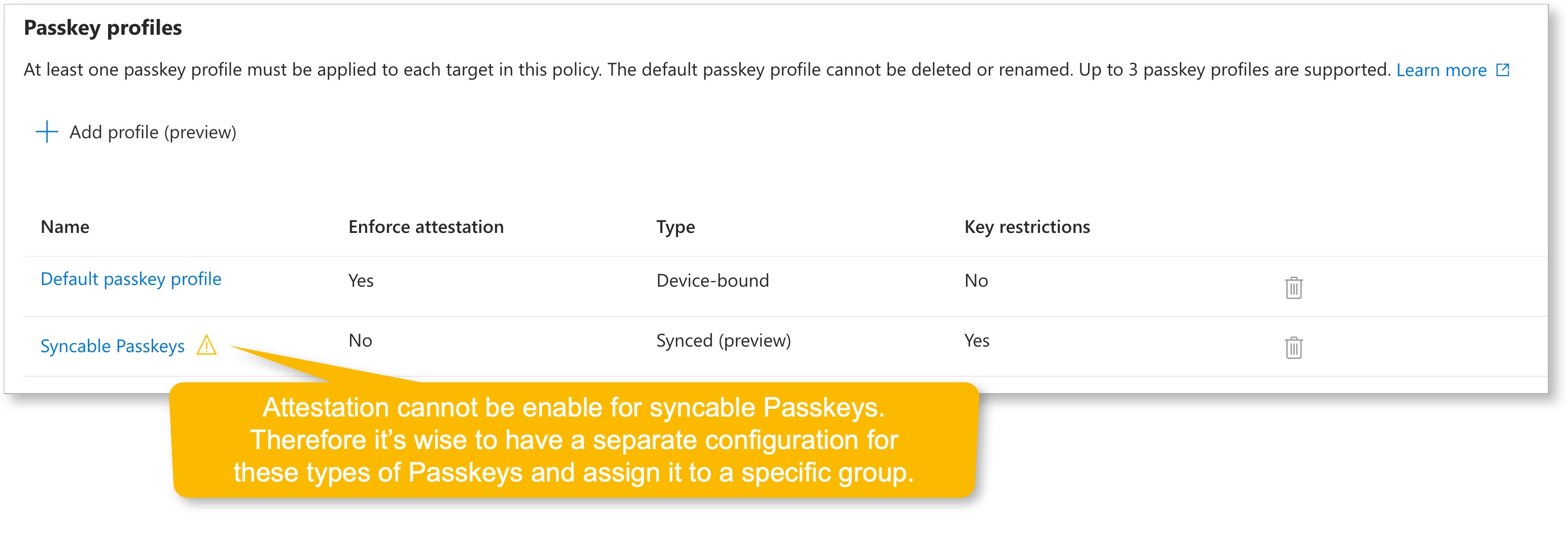 Example of Passkey Profiles
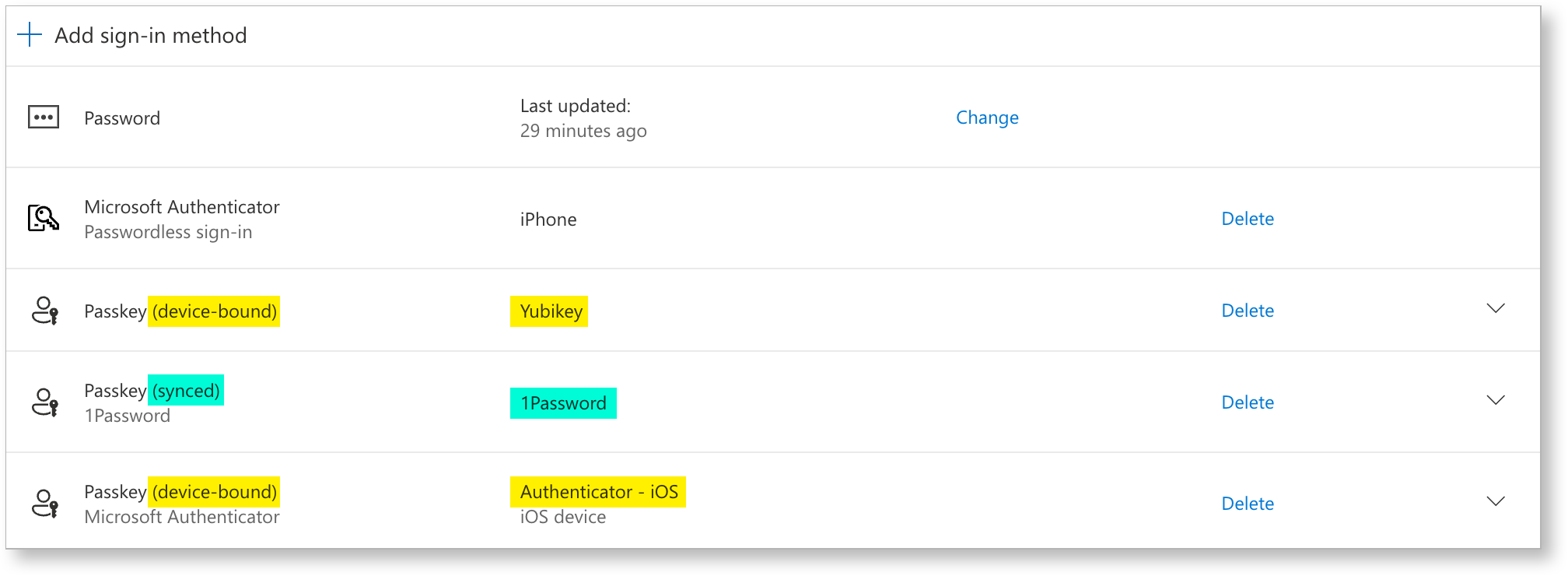 Example of syncable Passkey in 1Password
Attestation
In passkeys (WebAuthn), attestation is about proving what authenticator created the credential using cryptographic evidence during registration.
The relying party (Microsoft Entra ID) can validate that evidence against trusted metadata to decide whether to accept that authenticator model.
Without attestation, passkeys are ‘just’ key pairs.
You’ll still get a strong key-based login, but the service cannot reliably prove which authenticator model/provider generated the keys (or whether claimed identifiers are genuine).
I hear you say: “but we also have the AAGUID allow/block list”. Well yes, but there’s a distinction:
-
With Require attestation = Yes
• TheAAGUID(and model identity) is anchored by verified attestation. • The allow list becomes a hard security control: you can reliably restrict to specific authenticator models/providers because Entra can verify “this really is that model”. -
With Require attestation = No (which you need for synced passkeys)
• Entra may still see anAAGUIDvalue, but it can’t guarantee any attribute about the passkey, including whether it’s synced vs device-bound or even the specific provider/make/model, even if you targetAAGUIDs. Microsoft explicitly says to treatAAGUIDlists as policy guidance rather than a strict security control when attestation isn’t enforced.
So in this mode, anAAGUIDallow list is best understood as:
• A best-effort restriction that helps you steer users toward known providers.
• Not the same as cryptographic proof of “only these authenticators exist here”.
Guest accounts
Microsoft does not currently allow Entra ID guest users to register a passkey in your tenant, so getting guests onto passkeys is a bit less straightforward.
The workaround is to require them to register a passkey in their own tenant by enforcing phishing-resistant MFA in the Conditional Access policies they hit.
Once you configure “Cross-tenant access settings” for those partner tenants, you can trust the inbound MFA claim, because you know it aligns with your highest authentication strength thanks to your CA policies.
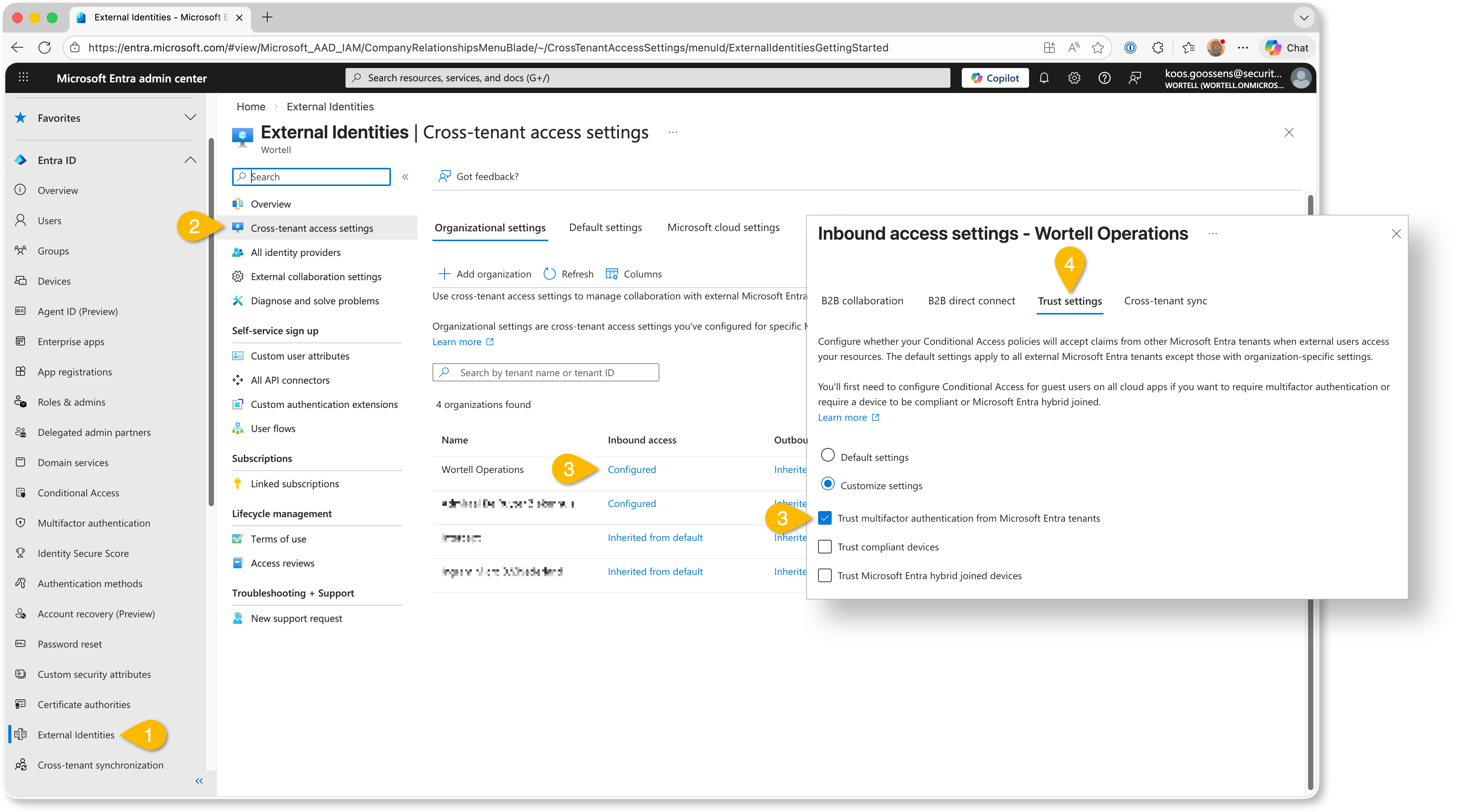 Example trusting MFA claims from partner tenants
Links
- How to enable passkey (FIDO2) profiles in Microsoft Entra ID (preview)
- How to enable synced passkeys (FIDO2) in Microsoft Entra ID (preview)
- Passkey Providers and their specific AAGUIDs (Authenticator Attestation Global Unique Identifier)
- Least privilege for Temporary Access Pass creation
- How to find unattested device-bound passkeys in Entra ID)
- Interrupt vs. Manage mode
Community Project(s)
This month we saw something really cool happen in the community.
It started with Fabian Bader, who we have mentioned before as one of the contributors to Maester. Fabian wrote a blog about a tool he created: Invoke-EntraIDPasskeyLogin.ps1.
It lets you authenticate against Microsoft Graph with MFA as a user, but from a script. Using passkeys. Pretty clever stuff!
Then Nathan McNulty picked it up and built a standalone version: PasskeyLogin.ps1. His version uses a passkey exported from Azure Key Vault.
And then Jos Lieben thought, “hold my beer” and took it even further. So he created New-FidoKey.ps1, which can actually generate the passkey for an account.
That is three community members building on top of each other in a short amount of time.
Using these methods obviously raises security concerns. But with the new passkey profiles features, you can create a dedicated automation profile for a dedicated account, while still enforcing stricter requirements for normal interactive logins.
From a security perspective, you have to be very careful here.
You need proper scoping, secure storage of the passkey material, and a very clear understanding of what you are enabling.
When done responsibly, though, this can be extremely powerful. Think automated environment provisioning, one-time onboarding tasks and other interactions with APIs that would otherwise require manual MFA prompts.
And beyond the technical details, the most impressive part is how the community came together. People spending their spare time creating tools and simply giving them to the rest of us. That deserves recognition. 👏🏻👌🏻💪🏻