02x01_scu_later_alligator.json
In this episode, Chris explores Agent 365 while Koos takes another look at Security Copilot. Since our last episode, several new announcements have dropped, making this a great time to dive in and see how these tools can help streamline the work of security teams.
Agent 365
If 2024 was the year of LLMs, and 2025 was the year of AI Agents then I’m really hoping 2026 will be the year of AI Governance! Microsoft frames Agent 365 as the foundation for the emerging “agentic era,” where autonomous agents are not just assistants but participants in business processes.
What is Agent 365?
Agent 365 is Microsoft’s new “control plane” for AI agents across Microsoft 365, Teams, Dynamics, Power Platform, and third‑party systems.
It provides a central place to register, manage, monitor, and govern agents, similar to how organizations manage human users today.
Agents get a unique Entra Agent ID, which allows them to authenticate, follow least‑privilege policies, and operate like secure digital workers.
But why?
Agent sprawl is real - Organizations start experimenting with copilot, custom agents, and workflow bots, and quickly lose track of where agents exist and what they’re doing. Agent 365 counters this with a centralized registry and inventory, providing full visibility.
AI agents need different governance than human users, think about it - agents:
- Act autonomously
- Trigger workflows
- Access sensitive data
- Act continuously and at scale
This creates new compliance, security, and operational risks. Agent 365 provides logging, access controls, threat detection, and lifecycle management specifically designed around agent behavior. Agent 365 standardizes the governance approach regardless if agents come from Microsoft, third parties like ServiceNow, or your internal Copilot Studio builds.
Agent 365 features
Agent 365 unlocks five capabilities that make enterprise-scale AI possible:
- Registry – provides a single inventory of all AI agents so organisations can see what exists, who owns them, and how they behave.
- Access Control – uses Entra Agent IDs and least‑privilege permissions to ensure every agent only accesses the data and systems it truly needs.
- Visualization – offers dashboards and telemetry that help IT and security teams monitor agent performance, risk signals, and ROI.
- Interoperability – connects agents with Microsoft 365 apps, organisational data, and third‑party platforms so they can operate across business workflows.
- Security – extends Microsoft Defender protections to agents, detecting misconfigurations, vulnerabilities, and threats like prompt‑injection or risky data access.
What about licensing?
As always with licensing - it’s complicated. Agent 365 introduces a new per‑agent A365 SKU that licenses AI agents as digital workers inside Entra ID, while keeping all existing Microsoft 365, Copilot, and Azure OpenAI licensing in place — resulting in clarity of governance but complexity in cost and deployment.
- Agents require their own licence (A365 SKU) - Agent 365 uses a dedicated A365 licence that must be assigned to each AI agent instance. These licences are not for humans
- Agents appear in Entra ID like digital employees - Licensed agents receive an Entra Agent ID and can show up in org charts, have permissions, and interact with systems like a user account.
- Agent 365 does not replace existing Microsoft licences - Human users still need their usual Microsoft 365, Dynamics 365, and security/compliance licences.
- A365 covers governance, not model execution - The A365 licence pays for the control plane not AI inference itself.
You need to be part of the Frontier preview program to get early access to Microsoft Agent 365.
Security Copilot
I mentioned AI news but before we dive into that subject there’s one other news item I had to share.
Sentinel data lake now supports Defender XDR logs
In episode 10, we brought in September of last year, I talked about Sentinel data lake. And one of the major shortcomings back then is now resolved.
You can now extend Defender XDR data into data lake natively without any additional complex tooling and solutions!
Just to into your tables overview, select DeviceNetworkEvent for example, and extend its retention into data lake by increasing it beyond the default 30 days. Storage costs are roughly $ 0.025 per GB/month without query costs.
Microsoft brings Security Copilot for free for E5 customers, FOR FREE!
Yes, that right folks.
Customers with Microsoft 365 E5 will have 400 Security Compute Units (SCU) each month for every 1,000 paid user license, up to 10,000 SCUs each month at no additional cost.
- Example 1: An organization with 400 user licenses gets 160 SCUs/month.
- Example 2: An organization with 4,000 user licenses gets 1,600 SCUs/month.
At first I was like; “ah there’s the catch!” With 1600 SCU’s per month is only little over 2 SCU’s per hour. And I remember how quickly I burned through those in no time a couple of months ago.
First, it’s good to understand that is is not converted into an hourly rate. You actually have tho’se SCU’s to spend within a month. You can spend them over the course of 30 days, or all in a single day. That’s up to you.
Which brings me to the seconds points: agents!
I would advise starting by only using the SCUs for running Security Copilot Agents and using Microsoft Sentinel MCP Server for LLM-based contextual questions.
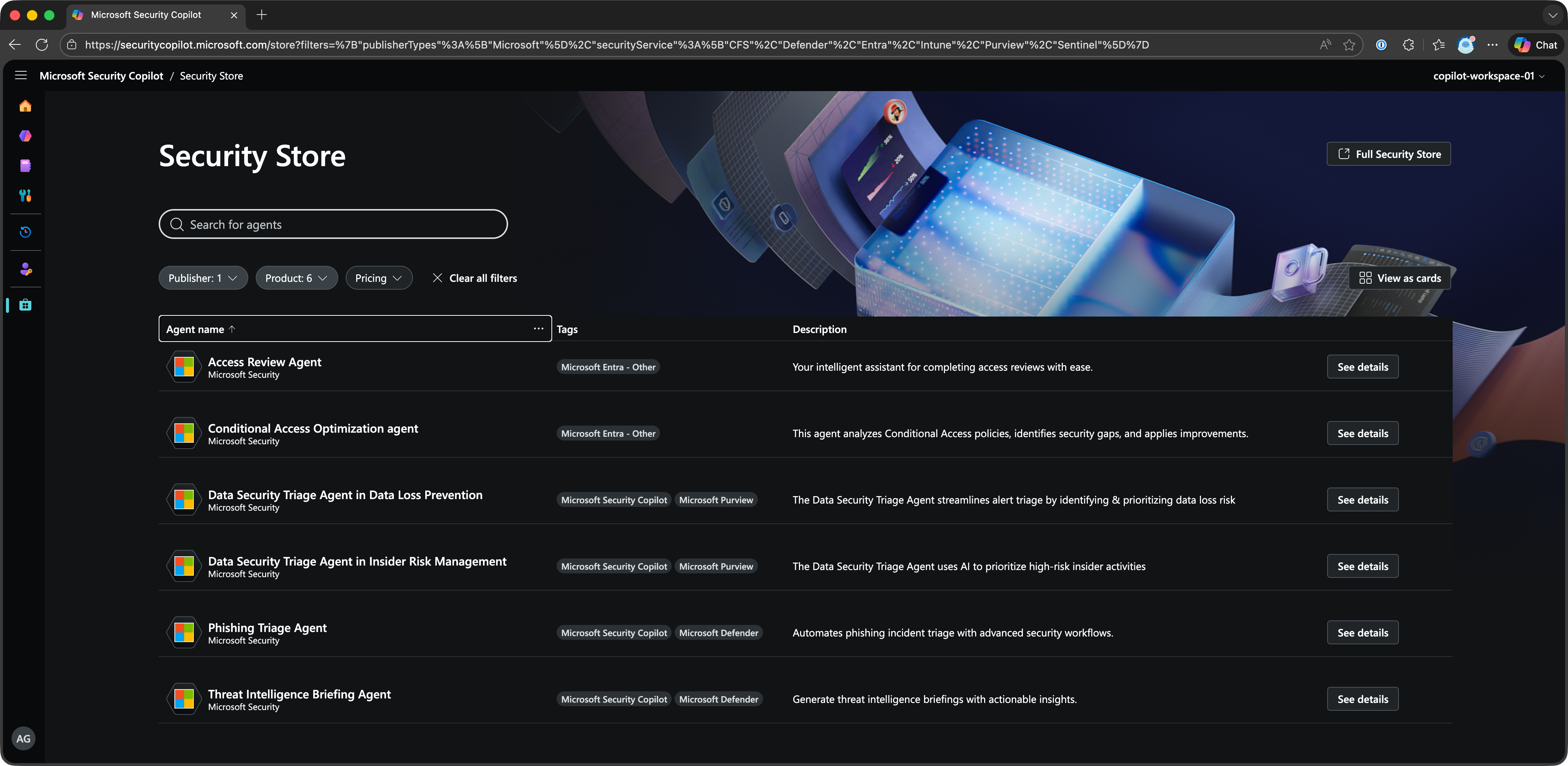
Microsoft provides several Agents from their “Security Store” like the “Phishing Triage Agent” which will automatically perform otherwise manual tasks like its name suggest.
You can also find a lot of third-party agents in this store or even build your own.
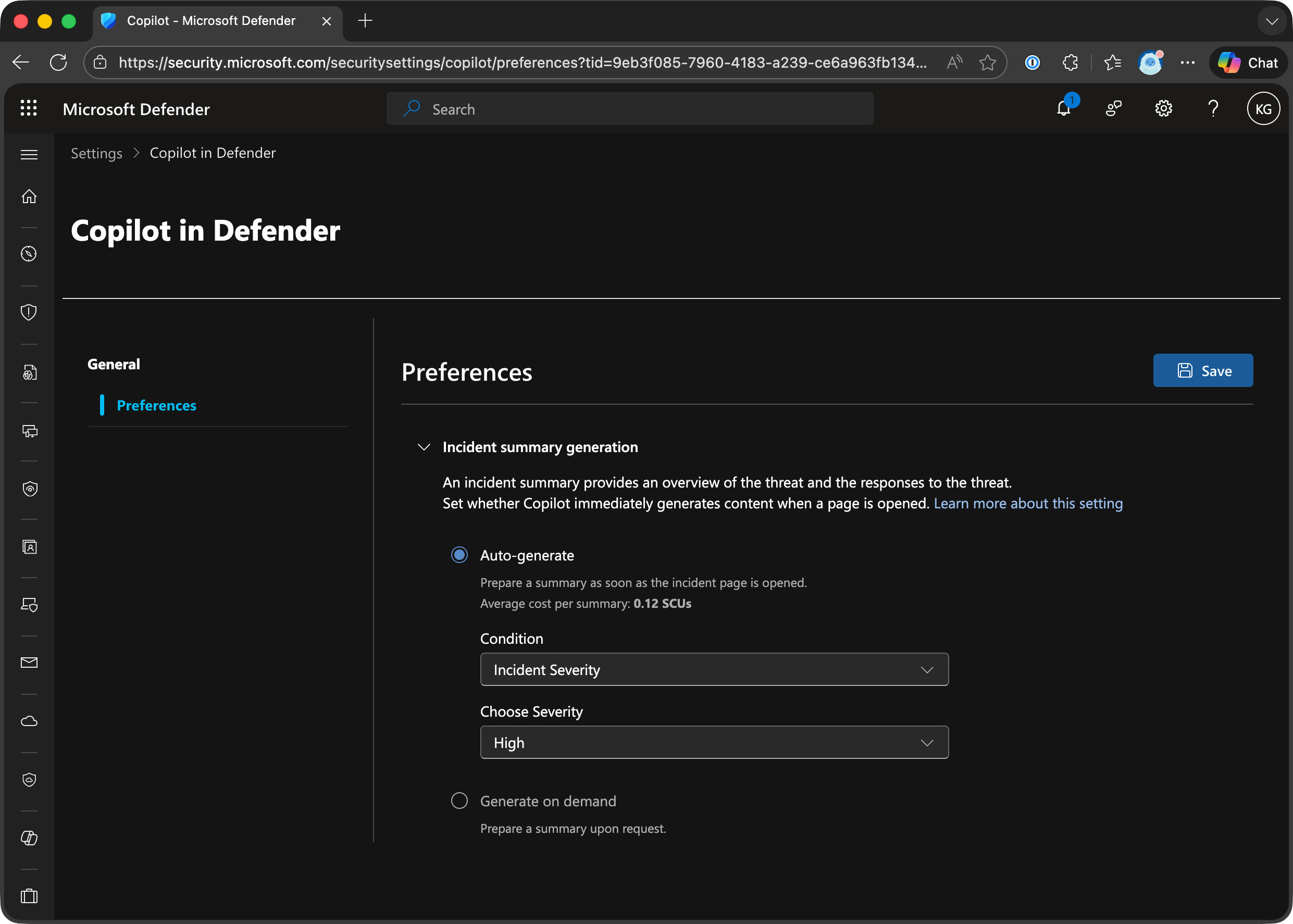
PRO TIP set your incident summary generation to “Generate on Demand” (Settings —> Copilot in Defender —> Preferences)
This will save you A LOT of unnecessary SCU usage!
The bad news unfortunately is that Microsoft is still rolling out to customers. It’s probably a capacity problem. If you’re eligible you’ll receive a notification 30-days in advance before they activate it for you.
All those new shiny AI tools also come with new attack vectors
Entra ID Identity Protection for Agents is available in Preview
Because agents can operate autonomously and on behalf of a user, they can display unique sign-in behavior. Agents can take initiative, interact with sensitive data, and operate at scale. Microsoft Entra ID Protection for Agents is designed to identify and mitigate risks associated with these capabilities.
And once Identity Protection flags a user as risky, you can prevent them from accessing certain resource with Conditional Access by blocking certain Risk Levels.
Creating your own Agents within Copilot Studio also comes with some risks
Because Prompt Injection Attacks exist, data can potentially be exfiltrated through conversations and AI permissions can be abused thru Privilege Escalation.
Fellow Security MVP Raymond Roethof (he’s Dutch of course 😉) wrote an excellent blog about how you can protect Copilot Studio with the help of Microsoft Defender for Cloud Apps. Definitely check this out.
YELLOWHAT Capture-the-Flag was hacked with AI
During YELLOWHAT on January 13th, people on-site were able to compete in a Capture-the-Flag we got provided through Blu Raven.
Nicola Suter decided to see what’s possible with AI. He used Azure Fabric Real-time Intelligence MCP Server to connect to the lab environment and let AI assist him during his hunt.
He wrote down his experience and lessons learned in a blog you should also check out.
Links
- Security Copilot inclusion in Microsoft 365 E5 subscriptions
- Microsoft Security Copilot Agents overview
- Entra ID Identity Protection for Agents
- Configure and enable risk policies in Conditional Access
- Microsoft Copilot Studio: Real-time protection for AI Agents with Microsoft Defender for Cloud Apps
- AI just solved a CTF for me!
- Generative AI training for Beginners
- Enhance security operations by using Microsoft Security Copilot
- Elevate Your Cyber Defense Skills with Blu Raven
- Agent Identity Security
Community Project
Azure Sentinel Solutions Analyzer by Ofer Shezaf - The SIEM Guy @ Microsoft
People in the community probably know his as the father of Sentinel. 😉
Het worked on ArcSight @ HP and came to Microsoft in 2019 to help create Microsoft Sentinel.
I get asked all the time which tables each Sentinel connector writes to. Surprisingly, the answer isn’t straightforward: many connectors share tables, others write to multiple tables, and—until now—there hasn’t been a single, complete list. So…I built one. 🚀 (Okay, a GitHub Copilot agent with Claude Sonnet 4.5 did most of the heavy lifting 😅)