02x04_terminal_velocity.tui
In this episode Chris covers some common Intune deployment mistakes he’s come across while working with various customer environments. And Koos has become a full-time Claude (Code) user over the past months and wants to share why he’s blown away. A few real-world stories where an AI agent saved the day. Or actually MULTIPLE days worth of work. ;). There’s been a lot of talk lately about different models and multiple AI services seem to have been offering multiple different models to pick from. And even then; the same model can feel completely different depending on which “harness” it runs inside. Koos will explain what that is and why the right harness for the work you do matters more than the model sitting underneath it.
Intune Done Wrong
Intune is powerful, but it’s not plug-and-play. I’ve noticed too many times that orgs set up a few policies, enrol some devices, and assume they’re done. The result is a tenant that looks healthy but isn’t actually enforcing anything or there a massive holes in what is being enforced. A tenant reporting 100% device compliance can either mean strong security or a silent failure in policy setup. Here’s my list of common mistakes I see organisation’s make, if you pay attention to these you’ll have a more efficient Intune deployment.
Mistake 1: Leaving “No Policy Assigned” set to Compliant
This is the big one. Intune has a tenant-wide setting that determines how it treats devices with no compliance policy assigned, and it defaults to “Compliant.” This means any device that hasn’t been targeted by a policy automatically gets a green tick with no checks or enforcement. Find the setting here: Intune admin center –> Endpoint security –> Device compliance –> Compliance policy settings
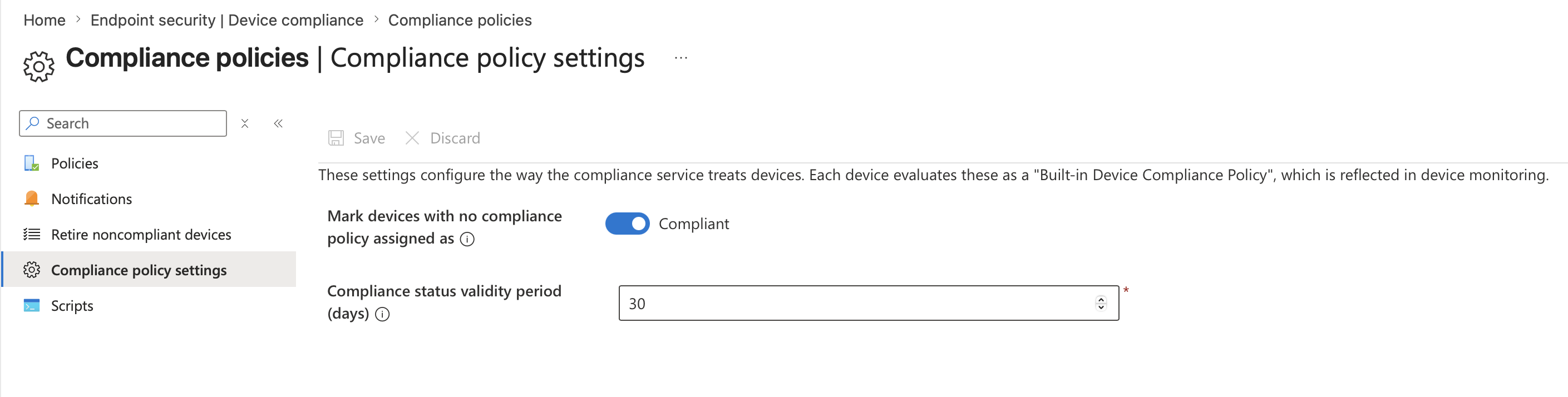
Microsoft recommends setting this to “Not compliant” so that only devices with an explicit, passing compliance policy can access resources. Use report-only mode in Conditional Access first to observe which users and devices would be affected before applying this setting. This setting pairs with the compliance status validity period (defaults to thirty days), which means if devices don’t check in within that window, they can appear non-compliant due to inactivity.
Mistake 2: Open Enrolment
Out of the box, Intune provides a default enrolment policy that applies to all user enrolments until a higher-priority policy is assigned. If you don’t tighten those defaults, any device can enrol including personal phones, old unsupported hardware, etc.
You should be setting platform restrictions to control what can enrol (block unsupported OS versions, block personal devices, etc), and device limit restrictions to cap how many devices a single user can register. Without restrictions, you end up managing a device estate you never intended to, and compliance becomes a nightmare because you’re writing policies for hardware you didn’t plan for.
Mistake 3: Not Using Assignment Filters
Assignment filters let you assign policies based on rules like OS version, manufacturer, device ownership type, or enrolment profile to narrow the scope so the right policies hit the right devices automatically. Without assignment filters, teams end up creating dozens of Entra ID groups to approximate the same targeting, which gets messy fast.
You can use assignment filters to separate corporate vs personal, target specific OS SKUs, or scope policies to specific hardware models. Say you’ve got a compliance policy that requires a complex PIN and biometric unlock, and you’ve assigned it to “All Devices.” That works great for your users’ laptops, but then you deploy a couple of Teams Rooms devices or shared kiosk machines and they immediately go non-compliant because they can’t satisfy those requirements.
Teams Rooms devices typically register with a manufacturer like “Lenovo” or “Yealink” and a model string that identifies them. A clean approach is filtering on the enrolment profile or device model:
(device.deviceModel -contains "Teams Room") or (device.deviceModel -contains "RoomBar") or (device.manufacturer -eq "Yealink")
Mistake 4: Skipping Conditional Access
I’ve seen orgs skip Conditional Access during deployment because it feels “too complicated,” Compliance policies are powerful, but often nobody does anything with the data. A non-compliant device should not be allowed anywhere near your environment. Compliance on its own is just reporting, it doesn’t actually block anything. Compliance status only blocks access if you link Intune policies to Conditional Access in Entra ID.
The advice: start in report-only mode and you’ll see what would happen before you enforce it. There’s no excuse to leave the doors wide open when you can safely test the impact first.
Why Koos is now a full-time Claude (Code) user
My AI arc so far
I’ve been using AI assistants for a couple of years now, starting with the regular ChatGPT, moving to Copilot inside the M365 suite, but also a lot of Github Copilot in VS Code for SOC- and development-work. Useful tools, all of them. But in the past few months I switched to Anthropic’s Claude Code as my daily driver, and the difference is on another level. I genuinely did not expect the gap to be this big.
This episode is not a commercial for Claude. It’s me trying to explain why the experience differs so much, even when you think you’re comparing apples to apples (for example, using the same Sonnet 4.6 model in two different tools). The short version: the model is only half of the product. The other half is what the industry is now calling the harness.
Before we get there, two stories from the past few months where Claude Code saved me, quite literally, multiple days of work.
Story 1: the APIM blast radius investigation
An organization in The Netherlands (who eventually became a customer after this engagement) suspected they had a problem. They had built their public-facing estate around Azure API Management, assuming that because all traffic flows through APIM, the backend App Services, Functions, AKS workloads, and Container Apps behind it were shielded. Classic “API gateway as security boundary” assumption.
The reality was worse than they feared:
- An adversary had obtained the APIM master subscription key. With it, the attacker could read the APIM configuration, including the full list of backend services and the exact URLs APIM was forwarding traffic to.
- Most of those backend services were directly reachable over the public internet. There was no VNet integration, no Private Endpoints, no IP restrictions, nothing forcing traffic through APIM.
- APIM policies contained hard-coded authentication headers (subscription keys, static bearer tokens, API keys for upstream SaaS). Once the attacker could read the policy XML, those secrets were effectively leaked too.
I got read-only access to their Azure tenant and needed to answer a few question fast: “What is exactly exposed? How do we plug the holes? And which should we prioritize first?”
This is where Claude Code really shined. I explained the situation and it told me it needed AZ CLI to have a peek at the environment. With my consent it installed the required modules and plugins and went to town. Over a single session it:
- Crawled the entire Azure estate.
- Mapped backends to frontends.
- Checked public accessibility of each backend.
- Produced a prioritized remediation list. Not just “these are exposed” but also “and here’s how to reconfigure each.”
A human doing this would’ve needed to hold a lot of context in their head at once. Which Azure Resource can be make private with what configuration? There’re are obvious differences between aan App Service, a Function, a Logic App and a Blob storage. And getting a list of all of those backend API’s across multiple Azure subscriptions so quickly was gold.
The customer was able to start closing holes right away. Would I have gotten there eventually by hand? Sure! Would it have taken me three or four full days? Also yes…
Story 2: detection engineering in French
Different customer, different problem. A SOC engagement where we were onboarding custom log sources into Sentinel. One of them was a third-party HR application used across a multinational. The logs were already flowing in via a custom data connector we had built earlier. Now came the fun part: detection engineering. What should we actually alert on?
HR apps are interesting targets. They hold a lot of sensitive data like identity information, salary info, hiring procedures, acquisitions and maybe even pending terminations.
I brainstormed with Claude Code on the use cases. My customer already provided me a wishlist of potential detections. I fed this Word document to Claude, then pointed it at their Sentinel workspace (via the Azure MCP server, so it could execute KQL directly). We had previously run a few simulated exercises where a colleague played attacker and generated a handful of these events inside a dataset of several million rows of normal activity. The catch: the HR app’s audit log are mostly in French!!
Claude:
- Explored the table schema and sampled rows to understand the log structure.
- Built a translation mapping for the action verbs and event types it kept encountering and stored English translations as a lookup table
- Wrote KQL queries for each of our detection ideas, joining against the translation table so the incident title and entities came out in English.
- Tested each query against the real data, found the simulated events among the millions of rows.
- Generated the Analytic Rule JSON (ARM template schema, the one Sentinel actually expects when you deploy rules as code) for each detection.
- Committed the files to Git with sensible commit messages and opened a pull request against our SIEM-as-code repository.
I watched it do all of this. I pushed back on some of the KQL choices, it adjusted, re-tested, and moved on. The end-to-end flow from “let’s brainstorm use cases” to “PR open with tested rules” took an afternoon. I would have NEVER been able to complete this so quickly when I had to siff through the log rows manually.
Story 3: adding subtitles to a video
I recorded a short promo with my colleague Maarten when we were in Redmond during the MVP Summit. And later I though: “oh my, we’ve recorded in Dutch while we also want to be open to English-speaking attendees!” So I wanted to add subtitles, but never done this before.
I pointed Claude to the original video. It understood that it had to install some additional tools for me (OpenAI’s Whisper) and transcribed the video in Dutch. Then translated it into English and created a new subtitle (.srt) file with timecodes. And best of all: it told me how to import this into Davinci Resolve, the video editing tool we also use for our podcast!
So why does Claude Code feel so different? The “harness” question
Now here’s the thing that confused me for a while. You can also pick Claude Sonnet 4.6 inside GitHub Copilot. You can pick it inside Cursor. You can pick it inside Claude Code. Same model weights, same training, same context window. Then why does the experience vary so wildly?
The answer: you’re not just using a model. You’re using a harness.
What is a “harness”?
An agent harness is the full runtime wrapper around the LLM that turns it from a text-in-text-out function into something that can actually do work in the world. The model provides reasoning. The harness provides hands, eyes, memory, and guardrails.
A harness typically includes:
- The agentic loop. How does the model get called repeatedly? What triggers a new turn? When does it stop? Does it self-verify? Does it re-plan when things fail?
- Tools. Bash, file read, file edit, grep, web fetch, web search, task spawning, notebook editing. Each tool has a schema the model knows about and a permission boundary the harness enforces.
- Context management. How does the conversation stay coherent as it grows past the context window? Claude Code auto-compacts older turns. GitHub Copilot (CLI) for example manages context differently.
- Memory. Persistent knowledge about the user, the project, preferences.
- Sub-agents and orchestration. Can the agent spawn another agent for a side task and protect its main context from the noise?
- MCP (Model Context Protocol). The “expansion port.” Claude Code ships with MCP support out of the box, so I can plug in an Azure MCP server or a Sentinel MCP server and the model can use all of them the same way.
- Hooks. A hook is a shell command that the harness runs automatically in response to a specific event in the agent’s lifecycle. An LLM is non-deterministic. It might remember your request about “please cut down the amount of emoji’s and em-dashes” 95 times and forget once. Hooks turn that kind of guidance into a hard guarantee enforced by the runtime, not by the model’s judgment.
- Safety and permissions. Which tool calls need user approval? Which are auto-allowed? Can the agent run in “auto mode” for low-risk work but pause on destructive ones?
All of that is the harness. None of it is the model.
Same model, different harnesses
To make this concrete, here’s the same Sonnet 4.6 model running inside different harnesses:
| Harness | Strengths | Typical use |
|---|---|---|
| Claude Code (CLI) | Full filesystem access, shell, MCP, hooks, sub-agents, auto-memory, task system, worktrees | Deep coding and ops work on real repos |
| Claude.ai chat | Lightweight tools (web search, analysis), artifacts, projects | One-off questions, writing, light research |
| GitHub Copilot CLI | Deep GitHub integration (issues, PRs, Actions), auto model routing, BYOK (bring your own key), local model support | GitHub-centric workflows, repo automation |
| GitHub Copilot in VS Code | IDE-native, tight editor integration, inline suggestions, chat, agent mode | Coding inside the editor |
| Cursor | IDE fork optimized for AI editing, multi-file context, composer | Pair-programming style dev |
| Aider | Git-native, commits per change, terminal-friendly | Small, reviewable changes with clean history |
Same model, very different day-to-day feel. That’s the harness doing the work.
Why this matters for us as defenders
Choice of harness changes what the AI can actually do for you. A security engineer who lives in the terminal, handles incidents, writes KQL, manages Azure resources, and commits detection-as-code gets a lot more leverage out of a harness that speaks shell, filesystem, and MCP natively. An app developer who works in VS Code all day might prefer the inline experience of Github Copilot in the editor. A researcher doing long investigative queries might like the Model Council approach in Copilot Researcher, or Claude’s Cowork.
Pick the harness that matches the work.
The multi-model moment
There’s a broader pattern here that’s worth calling out. Microsoft itself has quietly become multi-model.
- Model Council in Microsoft 365 Copilot Researcher is now broadly available in the Frontier program. You submit one prompt, both GPT and Claude produce full reports in parallel, then a judge model summarizes where they agree, where they diverge, and what each uniquely contributed. It costs roughly 2.5x a single-model run but is excellent for high-stakes research tasks.
- Critique mode in Researcher has one model write and another (from a different provider) critique.
- GitHub Copilot CLI added “auto” model selection as generally available and now supports BYOK (bring your own key) and local models via Azure OpenAI, Anthropic, OpenAI, Ollama, vLLM, and Foundry Local endpoints.
The CLI / TUI resurgence
Chris introduced me to the work “TUI” last week. A Terminal User Interface
There’s another real cultural and technical shift happening in 2025-2026. Tools like Claude Code, GitHub Copilot CLI and Cursor’s new cursor-agent CLI have quietly become some devs’ primary interface for AI work. And it’s not just AI. Look at the wider terminal renaissance, terminals have never been more alive!
And I think it’s great! It feels like the quickest way possible to get things done. Hence the title of this episode. 😎

People who know me I love myself a nice script with some ASCII art. I even wrote some sort of love letter on Medium a while ago over the holidays. A trip down memory lane for everybody who was using a computer in the 90’s and 00’s. 😎
Token usage and pricing: what are you actually paying for?
“but how expensive is it?” Fair question. Let’s walk through the three big options and how they bill.
1. GitHub Copilot (including Copilot CLI)
Copilot uses a seat-based subscription with a premium request allowance on top. A premium request is roughly one interaction with an advanced model (GPT-5.4, GPT-5.3-Codex, Sonnet 4.6, and so on). Lighter models (GPT-5 mini, GPT-4.1) are included on paid plans and do not consume premium requests.
| Plan | Price | Premium requests / month |
|---|---|---|
| Free | $0 | 50 |
| Pro (individual) | $10 / user / month | 300 |
| Pro+ (individual) | $39 / user / month | 1,500 |
| Business | $19 / user / month | 300 |
| Enterprise | $39 / user / month | 1,000 |
Overage is $0.04 per premium request. The nice thing: predictable per-seat cost across your org. The not-so-nice thing: if you do heavy agentic work, 300 premium requests burn quickly (every agent turn with Sonnet 4.6 can be one request). Copilot CLI inherits the same plan, same allowance.
2. Claude.com subscriptions (Pro, Max)
Anthropic’s subscription route. Your Claude.ai login gives you the chat interface and Claude Code access inside the same subscription.
| Plan | Price | What you get |
|---|---|---|
| Free | $0 | Basic chat access |
| Pro | $20 / month | Full Claude.ai + Claude Code usage at base rate |
| Max 5x | $100 / month | 5x the Pro usage limits, priority access |
| Max 20x | $200 / month | 20x Pro usage, priority access to new models |
Usage is metered as rolling 5-hour windows (not individual tokens). If you hit the limit you get throttled until the window rolls. For heavy Claude Code users, Max 5x is the sweet spot. Max 20x is for the “I run agents all day” crowd.
3. Anthropic API (pay as you go)
If you want Claude Code or any Claude-powered app to bill per token directly, you use the API.
| Model | Input (per 1M tokens) | Output (per 1M tokens) |
|---|---|---|
| Claude Haiku 4.5 | $1 | $5 |
| Claude Sonnet 4.6 | $3 | $15 |
| Claude Opus 4.7 | $5 | $25 |
Prompt caching reduces input costs significantly (cached reads are ~10% of base input price), which matters a lot in long Claude Code sessions where the same file contents get referenced across many turns.
Which to pick?
Rough rule of thumb:
- Casual / exploratory user, uses AI across many tools: GitHub Copilot Pro at $10. Broad coverage.
- Daily coder / security engineer, heavy Claude Code user: Claude Max 5x at $100. Predictable, no surprise bills, and with prompt caching factored in you get far more than $100 of raw API usage.
- Team / org rollout: Copilot Business or Enterprise for the seat-management story. Consider Claude for Teams alongside if your engineers are Claude Code users.
- Automation / CI / pipelines where an AI call is happening without a human in the loop: raw API billing. You don’t want a subscription throttle blocking an automated pipeline.
Pricing might seem high at first. But try it and see what it might bring you. A Claude Max 5x or Github Copilot Pro+ subscription pays for itself in a week if you actually use it.
Takeaways
- AI assistants are no longer a novelty for defenders. They are legitimately saving days of work on real engagements, from incident response to detection engineering.
- The model is not the product. The harness around it is. Same Sonnet 4.6 in two different harnesses gives you two very different experiences.
- Pick your harness based on the work you do. For terminal-heavy, filesystem-heavy, multi-tool security work, agent-first CLIs like Claude Code or GitHub Copilot CLI are in a different league from editor-embedded assistants.
- The industry is going multi-model. Embrace it. Microsoft already has.
- Pricing is sane now. A Claude Max 5x or Copilot Pro+ subscription pays for itself in a week if you actually use it.
Links
- Introducing multi-model intelligence in Researcher (Microsoft 365 Copilot blog)
- Claude + GPT: Multi-model intelligence in Copilot (Microsoft Mechanics)
- Use Claude with Researcher in Microsoft 365 Copilot (Microsoft Support)
- Azure MCP Server (Microsoft Learn)
- MCP Center (Microsoft Azure)
- Copilot CLI now supports BYOK and local models (GitHub Changelog)
- GitHub Copilot CLI
- Claude Code (Anthropic)
- GitHub Copilot plans and pricing
- Claude plans and pricing
Community Project
InTUI - Intune Terminal User Interface by Jorge Suarez
A PowerShell terminal UI for managing Microsoft Intune resources via Microsoft Graph API.
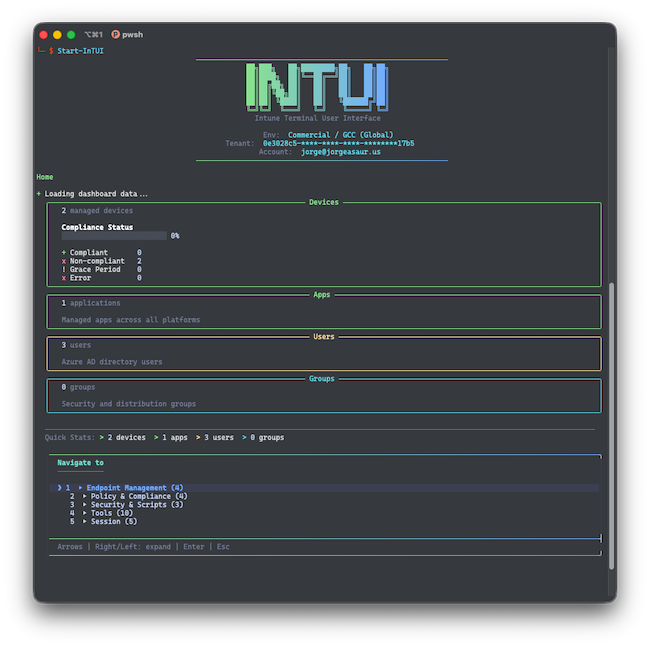
Features a Interactive TUI-driven connection flow with cloud environment selection, auth method choice (browser, device code, service principal), and saved tenant profiles a dashboard with summary panels with device, app, user, and group counts plus compliance statistics, with live auto-refresh mode and many, many more.
It also includes a number of tools:
- Global Search - Search across devices, apps, users, and groups simultaneously
- Command Palette - Quick navigation to any view via fuzzy search
- Keyboard Shortcuts - Vim-style navigation with shortcut bar and help overlay
- Bookmarks - Save and recall frequent navigation paths
- Navigation History - Recently visited views for quick re-navigation
- Script Recording - Record Graph API actions and export as replayable PowerShell scripts
- Caching - Local response caching with configurable TTL for faster navigation
- Assignment Conflicts - Detect groups targeted by multiple policies with conflicting settings
- Error Code Lookup - Maps common Intune error codes to descriptions and remediation steps